AI photo organizer app: sort a whole photo library into albums, find duplicate photos on a Mac, post from it
A photo organizer app that sorts a folder or, on a Mac, all of Photos into albums by what is in each picture, finds duplicates, and runs on your device.
By Mellow · UpdatedWhat does an AI photo organizer app do?
It looks at what is in each picture and files it for you. Cerebro, the photo organizer in Mellow Hub, reads a folder or, in Hub for Mac, your whole Photos library, and sorts every photo and video into 16 albums: selfies, people, food and cafés, travel, documents and receipts, screenshots, videos and more. It finds duplicates and says how much space they take, keeps your originals where they are, and the recognition runs on your own computer, so nothing is uploaded. Then you pick up to 10 pictures and send them into a post for up to 10 networks, or into a carousel.
Private by design: your photos stay with you
- Sorted on your device. In a browser the recognition runs in the tab; in Hub for Mac, on the Mac. The only thing downloaded is the recognition model itself.
- Mellow never receives your photos, their previews, their names or the list of files, and keeps nothing of them on its servers.
- Your originals are never moved, renamed or deleted.
- A picture leaves your device only when you send it to a post yourself, and then only that picture, to publish it.
- Hub for Mac asks macOS for access to Photos; you can take it back at any time in System Settings → Privacy & Security → Photos.
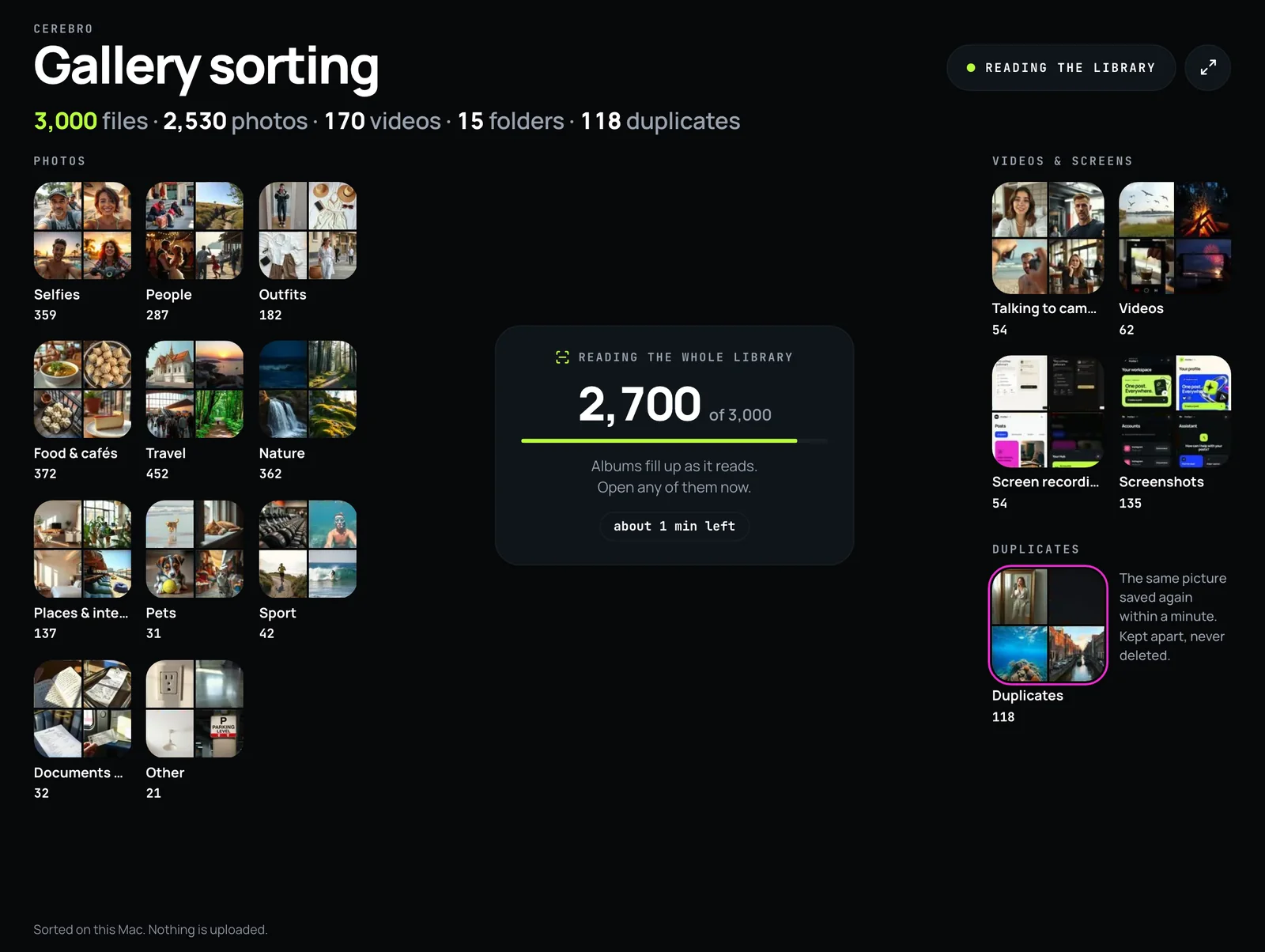
The 16 albums it sorts into
| Album | What goes there |
|---|---|
| Selfies | One face filling a good part of the frame, or a front-camera photo |
| People | A person is the subject: a face, two or more people, a child |
| Outfits | A person and clothes worn to be seen: jackets, dresses, shoes, hats, sunglasses |
| Food & cafés | Food, drinks, coffee, desserts, a restaurant or a café |
| Travel | Beaches, mountains, cities, airports, landmarks, luggage |
| Nature | Sky, sunsets, plants, forests, water, snow, wild animals |
| Places & interiors | Rooms, kitchens, buildings, shop fronts, streets |
| Pets | Cats, dogs and the other animals people keep |
| Sport | Workouts, the gym, yoga, ball games, a stadium |
| Documents & receipts | Printed pages, receipts, tickets, handwriting, a whiteboard |
| Screenshots | Screenshots, by what the file is and how it looks |
| Talking to camera | Videos whose first frame shows a face |
| Videos | Every other video |
| Screen recordings | Recordings of a phone or computer screen |
| Other | Whatever none of the albums above claims |
| Duplicates | The same picture saved more than once: one copy stays in its album, the rest wait here |
Every picture lands in exactly one album, the first that fits: a screenshot of a receipt is a screenshot, a selfie at the beach is a selfie. Duplicates are decided last.
In a browser or in Hub for Mac
| In a browser | In Hub for Mac | |
|---|---|---|
| What it reads | A folder you choose | The whole Photos library, iCloud Photos included, or any folder, an external drive, iCloud Drive |
| Where it recognises | In the browser tab, with a small image model downloaded to it | On the Mac, with Apple’s Vision framework |
| Duplicates | The same picture, by its fingerprint | The same picture taken within a minute |
| Keeping the result | Sorted copies in folders in Chrome and Edge; Safari and Firefox sort but cannot write folders | Albums in Photos (in a folder called Mellow), or sorted copies in folders |
| Your originals | Never moved, renamed or deleted | |
Hub for Mac 1.3.10 runs on macOS 14 or later. Download Hub for Mac.
Sort a library, step by step
- Open Cerebro in Mellow Hub, in a desktop browser or in Hub for Mac.
- Choose what to sort: a folder on your computer, or in Hub for Mac your whole Photos library.
- Watch it read: the pictures gather, then fly to 16 albums. Any album opens while the rest is still being read.
- Look through Duplicates and Screenshots. Cerebro says how much space they take and deletes nothing; you decide in Photos or in the folder.
- Keep the result: sorted copies in folders (Chrome, Edge and Hub for Mac), or albums in Photos (Hub for Mac). Originals stay where they are.
- Pick up to 10 pictures from an album and send them to a new post or to a carousel in Creative Studio.
Cerebro keeps its sort while you work in other parts of Hub, and Hub for Mac goes on reading in the background.
Duplicates and screenshots: what a library is carrying
A camera roll fills up with the same picture saved twice, bursts of near-copies and screenshots nobody meant to keep. Cerebro gathers them into their own albums and says how much space they take, so you can see the clean-up before you do it. It never deletes: the decision, and the delete, are yours, in Photos or in the folder.
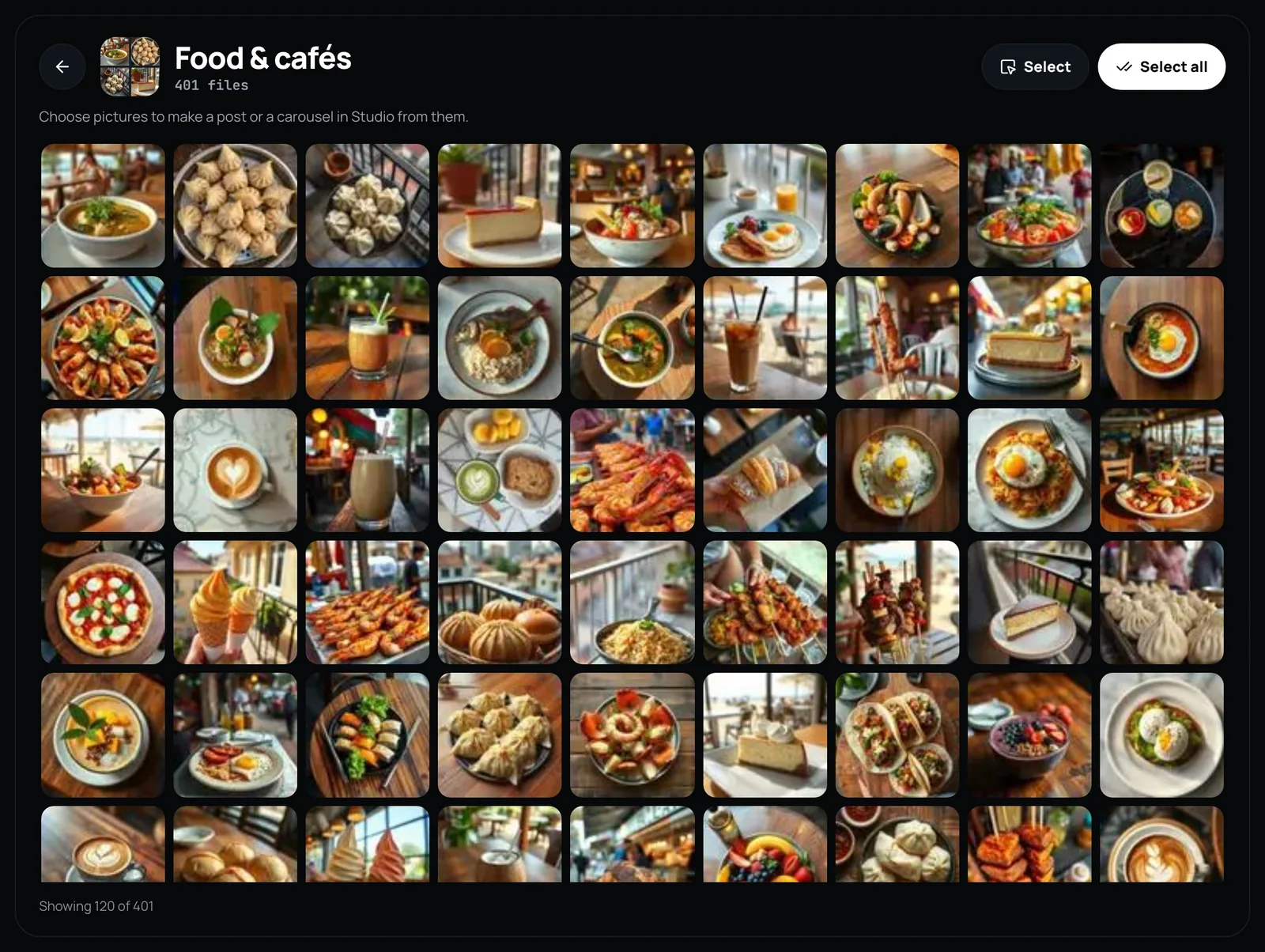
From an album to a post
This is where an organizer usually stops and Cerebro goes on. Open an album, press Select or Select all, and send up to 10 pictures to a new post, which Mellow Hub publishes to the networks you choose after checking each one’s limits, or to a carousel in Creative Studio. From Hub for Mac each picture goes as its original.
What it does not do
- It does not delete, move or rename anything you already have.
- It does not recognise or name people.
- It does not edit, enhance or retouch photos.
- In a browser it cannot read the Photos library or an iPhone directly: copy the photos to a folder, or use Hub for Mac.
- There is no iPhone or Android app for it.
Sort your library
Cerebro is part of Mellow Hub, included in every plan, with no AI credits for sorting. New accounts start with a 7-day trial.
Open CerebroOn a Mac, Hub for Mac sorts the whole Photos library and saves the albums in Photos.
Questions
Does Cerebro upload my photos to sort them?
No. In a browser the recognition model is downloaded to the page and every picture is read on your computer; in Hub for Mac it runs on the Mac with Apple’s Vision framework. Nothing leaves your device until you send pictures to a post yourself.
Can it delete duplicate photos?
It finds them and puts them in their own album with the space they take, and it deletes nothing. You delete them yourself: in Photos, which asks before anything goes, or in the folder.
How do I find duplicate photos on a Mac?
In Hub for Mac, Cerebro reads the whole Photos library and gathers the same picture taken again within a minute into a Duplicates album, with the space they take; it deletes nothing, so you look through them and delete in Photos. Photos itself, on macOS 13 Ventura and later, also shows a Duplicates album under Utilities that can merge them.
Does it work with iCloud Photos?
Yes, in Hub for Mac (macOS 14 or later): it reads the whole Photos library, iCloud Photos included, and can make the albums in Photos. A browser cannot read the Photos library; it sorts a folder you choose.
Does it work on Windows?
The browser version sorts a folder in a desktop browser; Chrome and Edge can also save the sorted copies into folders. Hub for Mac, which reads the Photos library, is for the Mac only.
How many photos can it sort?
The whole folder or library: every count is exact. It reads an even sample first and sorts it at once (in Hub for Mac up to 2,100 pictures, in a browser up to 480), then reads the rest with the albums already open.
Does it know who is in my photos?
No. It tells a selfie from a photo of people, and a video of someone talking from other videos, but it does not recognise or name anyone.
Is it free?
Cerebro is part of Mellow Hub and included in every plan; sorting takes no AI credits, because it runs on your device. New accounts start with a 7-day trial.