 DRAFT · CHANGES NEEDED
Give the reviewer a source of truth
Our fictional studio's brief says: beginner cup workshop, 3 October 2026 at 10:00, shaping a cup and adding a handle. The booking page owns the current price and collection details. No discount or same-day collection promise has been supplied.
The first caption above invents both. The corrected version uses the supplied facts and tells readers where to find the remaining details. It is ready for a decision, but the rewrite itself does not count as approval.
For your own post, attach the approved offer or source page to the brief. A reviewer should not have to decide whether an appealing claim is true from the caption alone.
Make the handoffs explicit
One person can perform all four jobs below. A team can split them. What matters is that someone owns the decision and that an edited post returns to review.
You can keep the editorial record in a document or your existing project tool. Hub's Review mode limits an agent's publishing authority. It does not add a multi-stage client portal, team invitations or editorial reminders.
Keep a changed post out of the approved queue
- 01
Prepare
Editor or agentGather the exact media, copy and destinations.
- 02
Review
Named reviewerCheck the facts and the final version.
- 03
Authorize
Person with publishing authorityApprove those accounts, files and time.
- 04
Verify
Publishing ownerCheck each destination and its live link.
Review the picture and the caption together
The example image shows a cup being assembled. It can support a sentence about making a handle. It cannot establish the workshop price, what a beginner will achieve, or when a fired piece will be ready to collect.
Open the actual final files. A thumbnail in a chat can hide a typo, a cropped face or the wrong slide order. For video, listen to the exported audio and read the captions on a phone.
- Facts: compare every offer, date and product claim with the source brief.
- Media: check the exact file, order, crop, spelling and permission to use it.
- Recipients: read the selected account names, including the active brand profile.
- Timing: confirm date, local time and timezone, especially if the offer expires.
- Format: resolve blocking validation errors and check required destination fields.
- Next step: open the real link and make sure the reader can do what the caption asks.
Leave a decision another person can follow
'Looks good' is hard to interpret after someone changes the caption. Name the version and the intended destinations. If the asset, text, recipient or time changes, ask for a new decision.
The record below is deliberately small enough to paste into a shared document. Do not put credentials, private account tokens or client contact lists into it.
Approve a version someone can identify
- Version
- workshop-intro-v2 · caption-v2.txt
- Media
- handle-demo-v2.jpg
- Account
- Example studio · Instagram only
- Schedule
- 28 Sep 2026, 09:00 Europe/London
- Decision
- Pending workshop host review
- After publishing
- Add the post reference and verified platform link
Set an agent up in Review mode
Autopilot is a different delegation choice. If that is not what you intend, change the connection's authority before continuing. Do not rely on a 'please ask me first' prompt to compensate for broader permissions.
Switch the review boundary on
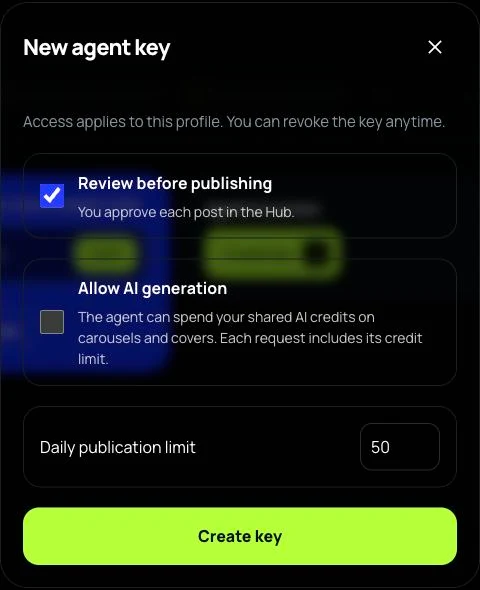
- Open Agents & access inside the intended profile (AI connections in the desktop sidebar), then choose Create key.
- Tick Review before publishing (a new key starts on autopilot) and set a daily publication limit that fits the task. Leave Allow AI generation off unless you intend to delegate credit spending.
- This quick key form applies to the current profile. For a connection limited to selected channels or an expiry, use a compatible client's OAuth authorization flow or the documented key API. Do not assume the quick form sets those restrictions.
- After connecting, ask the client to call whoami and list_channels. Check the mode and account names. Post creation requires posts:write and posts:publish; Review mode still leaves the publishing decision to a person.
- Open the prepared item in Hub, inspect the exact version and make the publishing decision there. Verify each destination after delivery.
Give the agent a bounded brief
Replace the brackets with real information. If the client cannot confirm the account or Review mode, stop that workflow and fix the connection before it creates the post.
Use my authorized Mellow Hub connection.
Call whoami and list_channels; show the mode and account names.
Prepare one post for [exact account].
Audience question: [question].
Approved facts and source: [facts and source].
Media: [final files I may publish].
Do not add offers, outcomes or dates absent from the brief.
Validate the input and explain any issues.
Prepare it in Review mode for my decision.
Check the result before trying again
A scheduled item means a job exists. A verified live item means the intended network reports delivery and the expected post is visible. Keep these states separate in your record.
When an API or MCP request times out, read its status first. Retrying the same request with the same idempotency key lets Hub identify the existing operation. A new key can create another post.
For a partial failure, inspect the failed destination. Do not resend successful destinations just to complete the set. Any content change needed for a retry should go back through review.
Common questions
Does Review mode replace an editor?
No. It controls publishing authority. A person still needs to verify the claims, media and intended recipients.
Can a client approve posts in a separate Hub portal?
This guide does not describe a separate client portal. Keep client feedback in your existing review tool, then have an authorized person make the publishing decision in Hub.
What should happen after an approved caption changes?
Treat the edited version as needing review again. Keep the version, account and time visible so a reviewer knows exactly what they are approving.
Keep going
About the examples: Mellow prepared this guide with AI assistance and checked product instructions against the current implementation. The ceramics studio, briefs and timings are teaching examples. The photos are generated illustrations, not customer work or evidence of publishing results.