
Is there an Instagram app for Mac?
Short answer
No. Instagram, Inc. publishes no app for macOS, and its iPhone and iPad app is not offered for Macs. On a Mac you use instagram.com in a browser, which Safari on macOS Sonoma or later can keep in the Dock as a web app. It posts photos, carousels and Reels, but not Stories. For Stories and scheduling from a Mac there is Meta Business Suite in the browser, and Mellow Kitty, a free Mac app that publishes and schedules all four formats.
What Instagram offers on a Mac
The App Store lists no Mac app from Instagram, Inc. Instagram’s app, which has run on the iPad since September 2025, is listed for iPhone and iPad only. Windows, by contrast, has an Instagram app of its own in the Microsoft Store. So on a Mac the choice is between the website and tools that publish for you.
| Way | Posts and carousels | Reels | Stories | Scheduling |
|---|---|---|---|---|
| instagram.com in Safari, Chrome or Firefox | Yes, up to 20 photos or videos in one post | Yes: a video you post becomes a Reel | No | Instagram documents it in the app only |
| Safari web app in the Dock | The same as instagram.com | The same | No | The same |
| Meta Business Suite in the browser | Yes, up to 10 photos | Yes | Yes | Yes |
| Mellow Kitty | Yes, 2 to 10 items in a carousel | Yes | Yes | Yes |
Meta Business Suite and Mellow Kitty both need a professional Instagram account, Creator or Business. Instagram lets tools publish only to those. instagram.com works with any account.
Put instagram.com in the Dock
Since macOS Sonoma, Safari can turn a website into a web app with its own window and Dock icon. Apple describes it in Use Safari web apps on Mac.
- Open instagram.com in Safari.
- Choose File › Add to Dock, or click the Share button and choose Add to Dock. Name the app and click Add.
- Open Instagram from the Dock and sign in there: a web app keeps its own cookies, apart from Safari’s. It is still the website, with the website’s abilities and limits, so there are no Stories.
Where Mellow Kitty fits
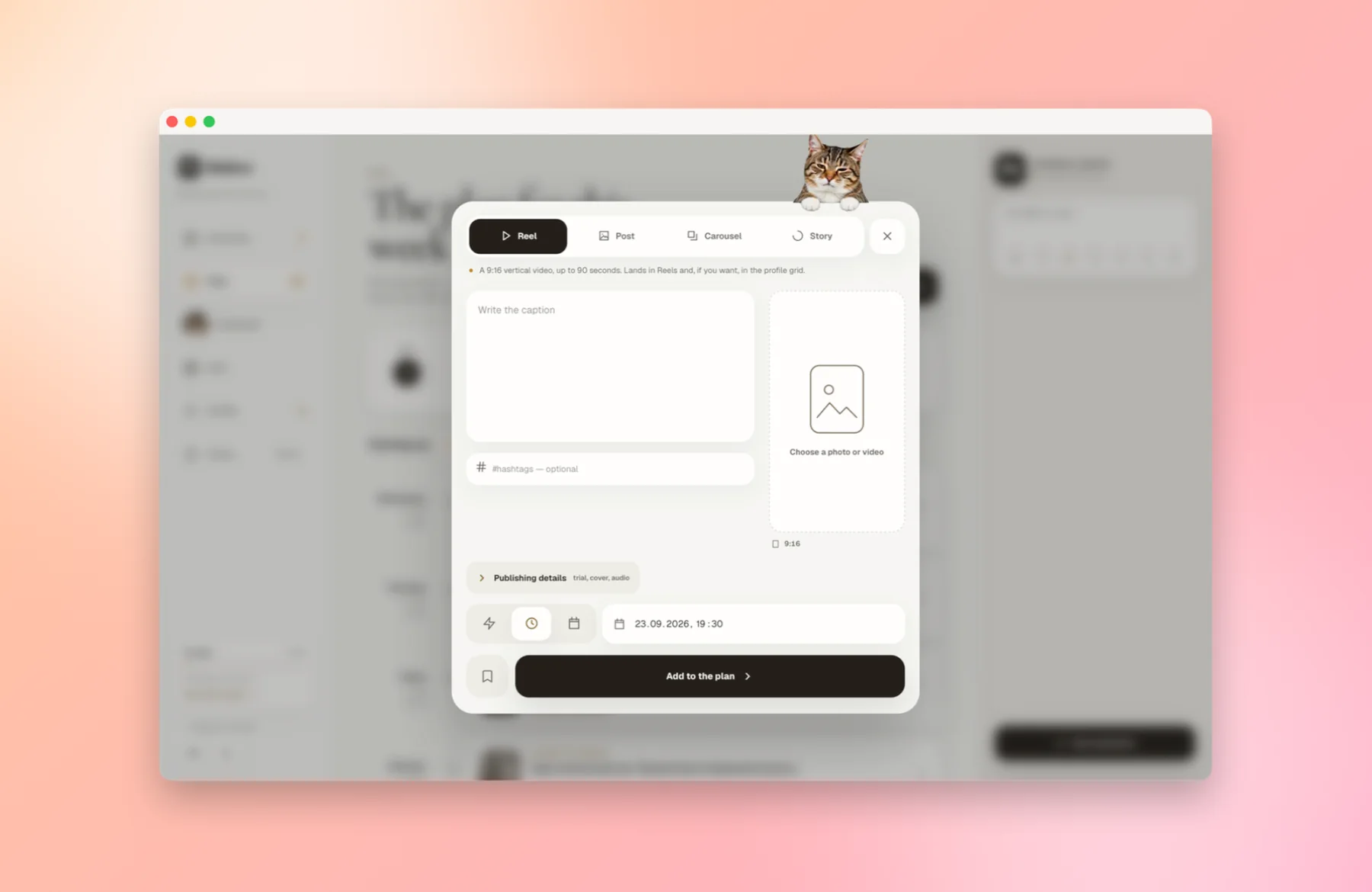
Mellow Kitty is a free Mac app for publishing to Instagram. Its window holds all of Mellow: the Plan with your schedule, the Grid that previews your profile, and an Assistant. A filmed tabby cat lives on the window’s edge. It publishes through Instagram’s official API, via our publishing service, Post for Me. It is free for up to 30 publications a month; the count starts again on the 1st.
Mellow is for publishing and planning. It has no feed, no messages and no comments, on purpose; keep instagram.com for those. It can’t add interactive story stickers such as polls and links, or music from Instagram’s library: post from the Instagram app when you need those.
Start in five steps
- Download Mellow Kitty from the Mellow Kitty page and open it. It runs on macOS 12 or later, on Intel and Apple silicon, and is signed and notarised by Apple.
- Sign in to Mellow in its window, or create an account there. It is free for up to 30 Instagram publications a month, with no card.
- Connect Instagram from Profile. You approve access on Instagram’s own screen; Mellow never sees your password. The account has to be a professional one, Creator or Business: Instagram only allows publishing through its API for those.
- Click New publication and choose Reel, Post, Carousel or Story. Pick the photo or video from your Mac and write the caption.
- Click Publish now, or set a date and time and click Add to the plan. Scheduling runs on Mellow’s servers, so your Mac can be asleep when the post goes out.
Questions people also ask
Is Instagram on the Mac App Store?
No. The App Store lists no Mac app from Instagram, Inc. The Instagram apps in the Mac App Store come from other developers, and Instagram’s own app is listed for iPhone and iPad only.
Can I post a Story from instagram.com on a Mac?
No. Instagram’s Help Center says sharing to your story isn’t available on computers, only in the Instagram app on phones and tablets. From a Mac, Meta Business Suite and Mellow Kitty can publish a Story to a professional account.
Is there an Instagram app for Windows?
Yes. Instagram publishes an app in the Microsoft Store. There is no equivalent for macOS.
Does Mellow Kitty need my Instagram password?
No. You connect Instagram on Instagram’s own sign-in screen, and Mellow receives access from Instagram, never your password.
Will Mellow Kitty run on an older or Intel Mac?
Yes, on any Mac with macOS 12 or later, Intel or Apple silicon.
Sources
- App Store: apps by Instagram, Inc.
- App Store: Instagram, for iPhone and iPad
- Instagram: Instagram for iPad (3 September 2025)
- Microsoft Store: Instagram
- Apple Support: using Safari web apps on Mac
- Instagram Help Center: Post a photo on Instagram (computer)
- Instagram Help Center: Share a post with multiple photos or videos (computer)
- Instagram Help Center: Record a reel on Instagram (computer)
- Instagram Help Center: Share a photo or video to your Instagram story (computer)
- Instagram Help Center: How to create and manage scheduled posts and Reels
- Meta Business Help Center: creating and scheduling Instagram posts in Business Suite
- Meta Business Help Center: Create and manage stories in Meta Business Suite
- Meta Business Help Center: using Business Suite with an Instagram professional account
- Meta for Developers: Instagram Platform overview (professional accounts)
Other companies’ features change. Every statement about them rests on these pages, as they read on the date above.