
How to schedule Instagram posts for free
Short answer
Three free ways. The Instagram app schedules posts, Reels and carousels for any public account, up to 30 days ahead, but not Stories. Meta Business Suite schedules posts, Reels and Stories for professional accounts, in the browser. Mellow schedules all four formats from the web or from Mellow Kitty on a Mac, free for up to 30 publications a month.
In the Instagram app
Instagram’s own scheduler is in its app. Any public account can use it. You can schedule up to 25 posts a day, up to 30 days ahead. From Instagram’s Help Center:
- Tap Create, then Post or Reel.
- Choose the photo or video and tap Next. Add the caption, effects or filters.
- Tap More options and turn on Schedule this post (or Schedule this reel). Choose the date and time.
- Tap Done, then Back, then Schedule.
Scheduled posts wait in your profile menu, under Your insights and tools › Scheduled content. There you can edit, reschedule, share now or delete them. Instagram notes that product tags, collaborative posts, sponsored posts and fundraisers don’t work with scheduled posts yet. The app’s scheduler doesn’t cover Stories.
In Meta Business Suite
Meta’s free tool, in the browser at business.facebook.com and in its mobile app. It schedules Instagram posts, Reels and Stories. It needs a professional account (Creator or Business), and you can sign in with your Instagram account without a Facebook Page. On a computer a post holds up to 10 photos. A Story can carry stickers and a link. Each item you create has a Schedule option with a date and time.
In Mellow, on the web or a Mac
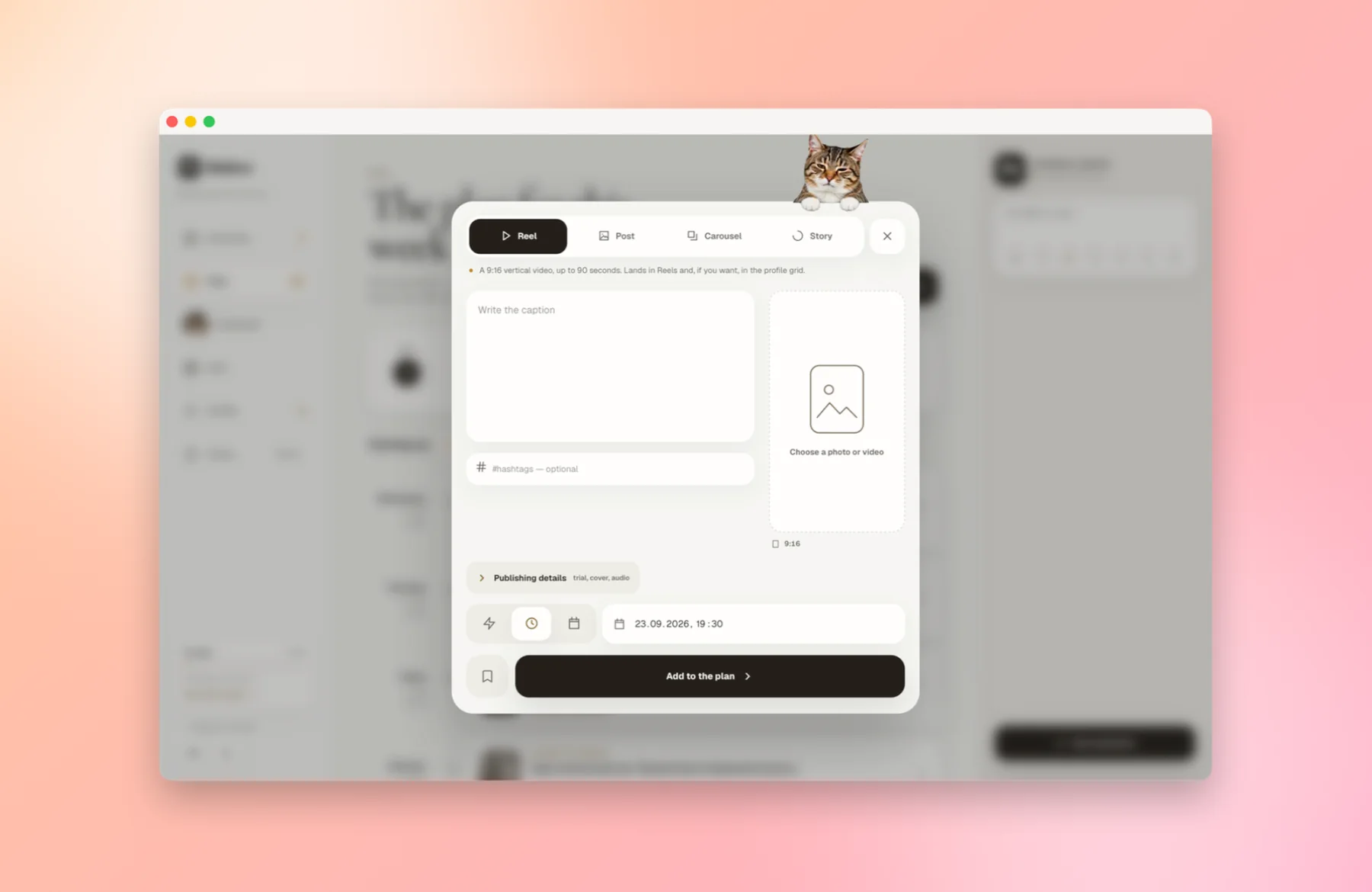
Mellow is free on the web and in Mellow Kitty, its Mac app, for up to 30 publications a month; the count starts again on the 1st. It schedules posts, carousels, Reels and Stories, and it needs a professional account as well. The Plan shows each scheduled post in a calendar, and the Grid shows how the profile will look.
- Download Mellow Kitty from the Mellow Kitty page and open it. It runs on macOS 12 or later, on Intel and Apple silicon, and is signed and notarised by Apple.
- Sign in to Mellow in its window, or create an account there. It is free for up to 30 Instagram publications a month, with no card.
- Connect Instagram from Profile. You approve access on Instagram’s own screen; Mellow never sees your password. The account has to be a professional one, Creator or Business: Instagram only allows publishing through its API for those.
- Click New publication and choose Reel, Post, Carousel or Story. Pick the photo or video from your Mac and write the caption.
- Click Publish now, or set a date and time and click Add to the plan. Scheduling runs on Mellow’s servers, so your Mac can be asleep when the post goes out.
Which one to use
| Instagram app | Meta Business Suite | Mellow | |
|---|---|---|---|
| Account | Any public account | Professional | Professional |
| Posts, Reels, carousels | Yes | Yes | Yes |
| Stories | No | Yes | Yes |
| From a computer | No, in the app | Yes, in the browser | Yes, on the web and in a Mac app |
| Price | Free | Free | Free for up to 30 publications a month |
If you only schedule a few posts from your phone, the Instagram app is enough. If you want Stories scheduled too, or want to work from a computer, use Business Suite or Mellow.
Questions people also ask
Can I schedule Instagram Stories for free?
Yes, in Meta Business Suite or in Mellow, both free and both for professional accounts. The Instagram app’s own scheduler doesn’t cover Stories.
Can a personal account schedule posts?
Yes, in the Instagram app, as long as the account is public. Meta Business Suite and tools that use Instagram’s API, Mellow among them, need a professional account.
How far ahead can I schedule a post on Instagram?
In the Instagram app, up to 30 days ahead and up to 25 posts a day, according to Instagram’s Help Center.
Does my computer have to stay on for a scheduled post?
No. The Instagram app and Meta Business Suite schedule on Meta’s side, and Mellow’s scheduling runs on its servers, not on your Mac.
Can I schedule a collab post?
Not with the Instagram app: its Help Center says collaborative posts don’t work with scheduled content yet.
Sources
- Instagram Help Center: How to create and manage scheduled posts and Reels
- Meta Business Help Center: creating and scheduling Instagram posts in Business Suite
- Meta Business Help Center: creating and scheduling reels in Business Suite
- Meta Business Help Center: Create and manage stories in Meta Business Suite
- Meta Business Help Center: using Business Suite with an Instagram professional account
- Meta Business Help Center: about Meta Business Suite
- Instagram Help Center: Share a photo or video to your Instagram story (computer)
- Meta for Developers: Instagram Platform, content publishing
- Meta for Developers: Instagram Platform overview (professional accounts)
Other companies’ features change. Every statement about them rests on these pages, as they read on the date above.