Cross-post one video to TikTok, Reels, Shorts and every network you connect
Post one video to TikTok, Instagram Reels, YouTube Shorts and your other networks at once, each network’s limits checked and long captions rephrased.
By Mellow · UpdatedHow do you post one video to every network at once?
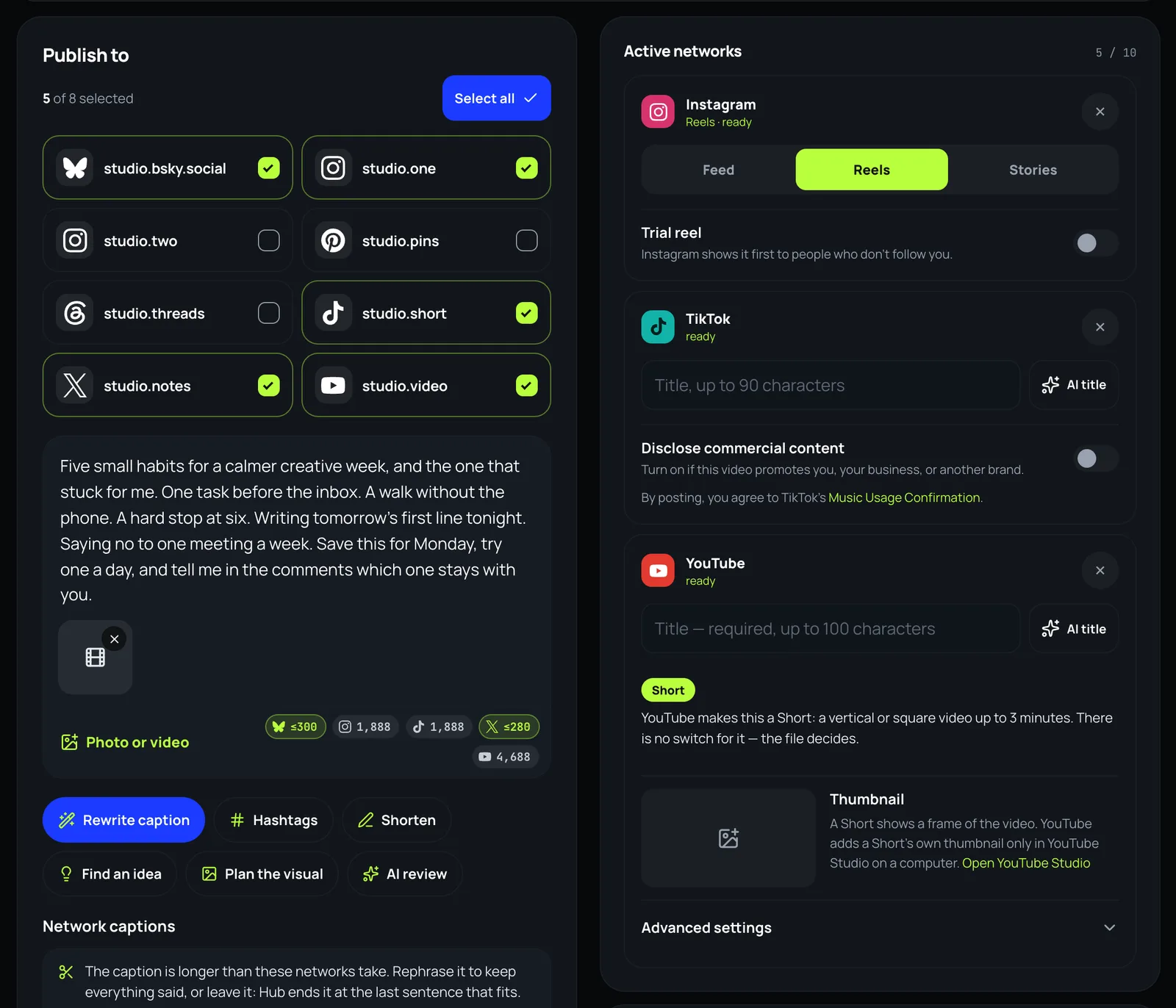
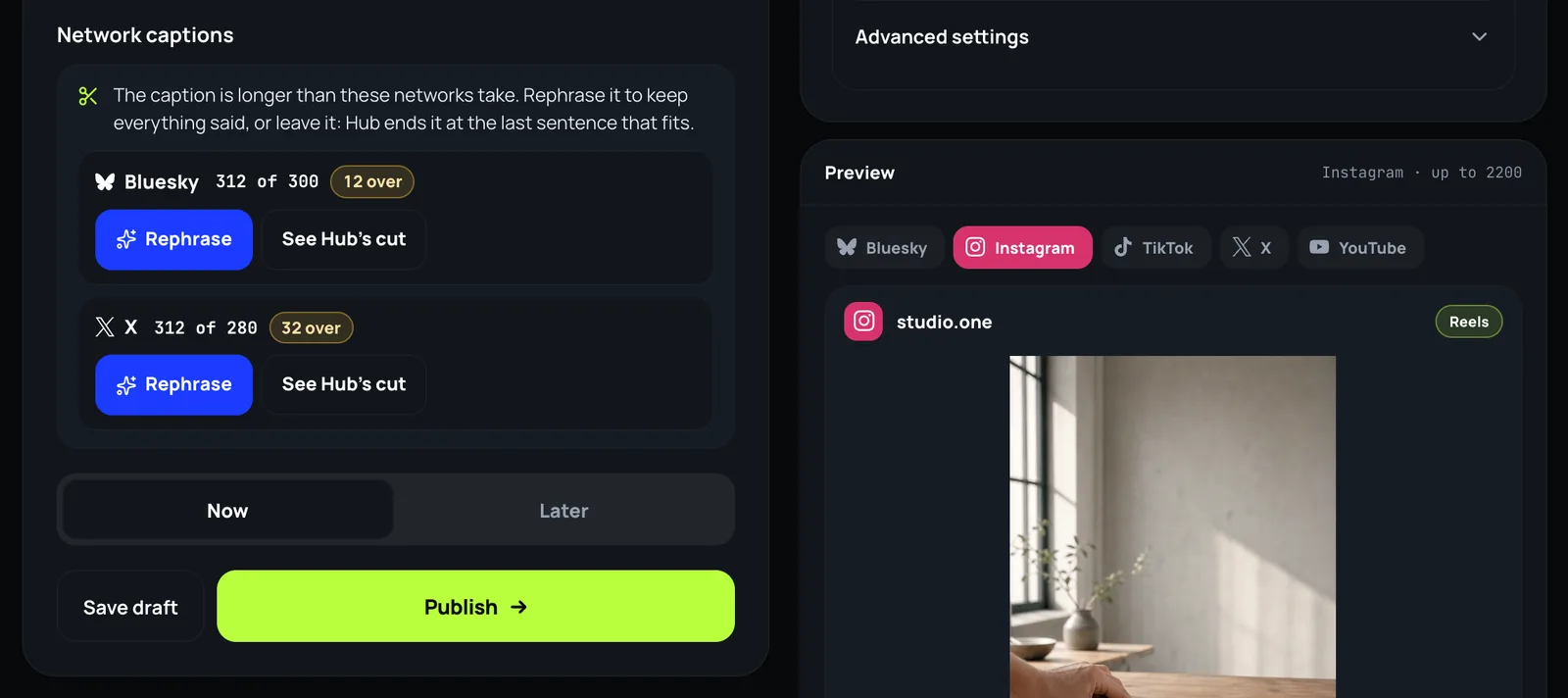
Upload the original file once and let one post carry it everywhere. In Mellow Hub’s composer you tick the accounts, add the video and one caption, and Hub fits the post to each network before it sends: YouTube gets the title it requires (up to 100 characters), X and Bluesky get a caption within 280 and 300 characters by their own counts, and a caption that is too long can be rephrased to fit, at no cost, or ended at the last sentence that fits. The video then goes to up to 10 networks, now or at a time you choose.
What each network takes
| Network | Caption | Title | Files |
|---|---|---|---|
| Up to 2,200 | None | 1–10 · video | |
| TikTok | Up to 2,200 | Optional, up to 90 | 1–35 · video |
| YouTube | Up to 5,000 | Required, up to 100 | 1 · video |
| X | Up to 280 | None | 0–4 · video |
| Up to 3,000, required | None | 0–20 · video | |
| Threads | Up to 500 | None | 0–20 · video |
| Bluesky | Up to 300, required | None | 0–4 · video |
| Up to 500 | Optional, up to 100 | 1 · video | |
| Up to 63,206 | None | 0–10 · video | |
| Telegram | Up to 4,096 | None | 0–10 · video |
These are the limits Hub’s composer and its checks read, from each network’s own published rules. X counts a link as 23 characters and an emoji as 2, Threads counts an emoji as its size in UTF-8, and Bluesky counts characters as you see them; the counters count the same way.
Cross-post a video, step by step
- Open the composer in Mellow Hub and tick every account the video should go to.
- Add the video once: your original export, not a copy saved from another app.
- Write one caption. The counter under it shows each network’s count against its own limit.
- Fill what a network asks for on its card: YouTube’s title, a TikTok title if you want one, Reels on Instagram.
- Where the caption is longer than a network takes, press Rephrase or keep Hub’s cut.
- Choose Now, or Later with a date and a time, and press Publish or Schedule.
What Hub does for each network
- Rephrase asks a model to say the same in fewer characters for that network, then counts the answer the network’s way and asks again if it misses. It costs no AI credits.
- See Hub’s cut shows the caption ended at the last sentence that fits, which is what goes out if you leave it.
- Instagram takes the video as a reel, YouTube as a Short when the file is vertical or square and up to three minutes, TikTok after its own review.
- An account you connect later can get the same posts: upcoming ones go out with it, and published ones get a copy at a time you pick.
What has gone out: from 19 October to 18 November 2026, Hub published 202 posts to Instagram, 155 posts to YouTube, 59 posts to LinkedIn, 47 posts to Threads, among others, Mellow’s own profiles included.
What it does not do
- It does not remove a watermark or edit the video: each network gets the file you uploaded.
- It does not post to a network that refuses the file or the caption; the post says which one and why, and the rest go out.
- It does not post to personal Facebook timelines or personal Instagram accounts: their APIs do not allow it.
Send your next video everywhere
The composer is part of every Mellow Hub plan, with Trends, Creative Studio and Montage. New accounts start with a 7-day trial.
Open the composerQuestions
How do I post one video to all social media at once?
Use a tool that publishes to each network’s API. In Mellow Hub you tick the accounts, add the video and one caption, and it goes to up to 10 networks in one post, now or at a time you choose, with each network’s rules checked before anything is sent.
Can I repost a TikTok to Reels and Shorts without the watermark?
Post the original file rather than a video saved from TikTok’s app, which carries TikTok’s mark. Hub sends the file you upload to every network as it is, so there is no watermark unless the file already has one.
Which cross-posting tool should I use?
If you post only to Instagram and Facebook, Meta Business Suite is free. Buffer, Metricool, Publer and others have free tiers with a few accounts. Mellow Hub is for posting one video to many networks at once, rephrasing captions to fit, and letting an AI agent prepare the posts.
Does each network get its own caption?
One caption goes to all of them, and Hub fits it to each network’s count: X takes 280 characters and Bluesky 300, counted the way each counts. You can also write a network its own caption.
Will YouTube make it a Short?
YouTube decides by the file: a vertical or square video of up to three minutes becomes a Short. There is no switch for it, in Hub or anywhere else.
What if I connect a network later?
Hub can send the posts you already made to an account you connect later: an upcoming post takes the new account and goes out with it, and a published one gets a copy at a time you pick.