AI social media manager: an assistant that prepares and posts within limits you set
An AI social media manager that writes, schedules and posts for you: Hub’s own Assistant, or Claude and ChatGPT within the accounts and daily limit you set.
By Mellow · UpdatedIs there an AI that manages and posts to social media for you?
Yes, within limits you set. An AI social media manager writes your posts, checks them against each network’s rules, schedules them and reads the results. In Mellow Hub that is the Assistant: type or say what you want, it prepares the post from your own accounts and recent posts, and the post is published only after your yes. If you would rather use your own AI, connect Claude or ChatGPT in AI connections: you choose the accounts, whether each post waits for your approval or goes out on autopilot, a daily ceiling of 1 to 1,000 posts and an expiry. Every action lands in a journal, and revoking takes effect on its next request. Either way one post can go to up to 10 networks.
What the others do: ChatGPT and Claude can write a post, but neither publishes to Instagram by itself: each reaches another service only through an app or a connector added for it. Meta Business Suite is free and schedules the Facebook and Instagram posts you make in it, and Instagram’s own app schedules too.
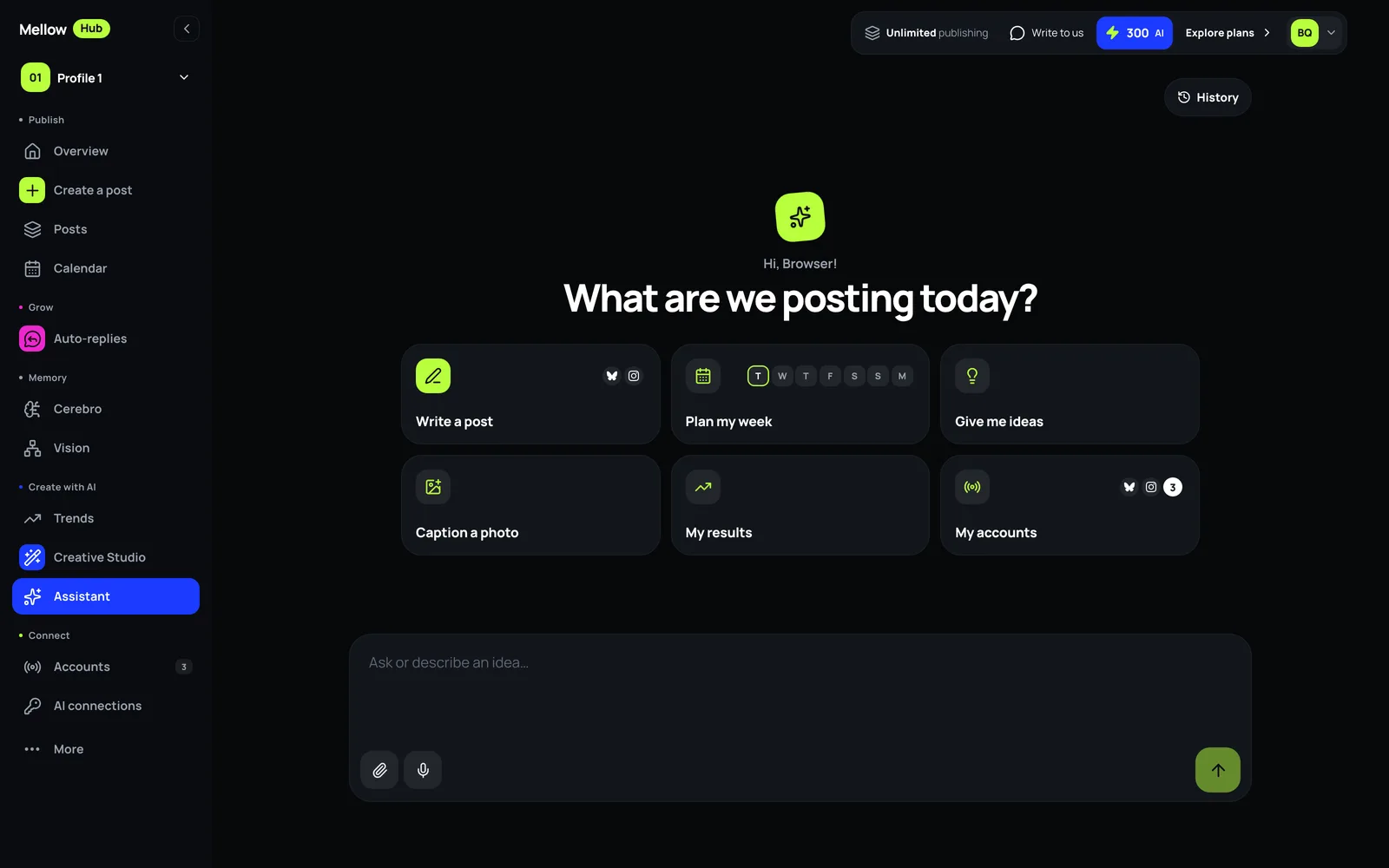
Four ways to get AI to help with posting
| Way | What it costs | Writes the post | Publishes it | Who says yes |
|---|---|---|---|---|
| ChatGPT or Claude on its own | Its own plan | Yes | No: only through an app or a connector for that service | Nobody has to: you copy the text and post it yourself |
| Meta Business Suite | Free | You do; its page says AI can help with content ideas | It schedules posts, stories and reels to Facebook and Instagram | You, post by post |
| Mellow Hub’s Assistant | Every plan, after a 7-day trial | Yes, from your profile’s own accounts and posts | After your yes, each time, to up to 10 networks | You |
| Your own AI through Mellow Hub | A Hub plan, and your AI’s own: Claude on any plan, ChatGPT on Business, Enterprise or Edu | Yes | Yes: to the accounts you ticked, up to your daily ceiling, until your expiry | You, once, when you approve the access; or each post, with After I approve |
OpenAI’s and Anthropic’s help pages, Meta’s Business Suite page and Instagram’s scheduling page were read on 24 November 2026. OpenAI’s page of connected apps names Google Drive, Slack, Gmail and others, and no social network; Anthropic’s names Linear, Slack, Google Drive and others. Custom connectors work on every Claude plan, with Free limited to one. ChatGPT’s custom servers take write actions on Business, Enterprise and Edu, on the web, and only read on Pro.
Set it up, step by step
- Connect your accounts in Accounts. You sign in on each network’s own page; no assistant can do this step for you.
- Open Assistant and type or say what you want: Write a post, Plan my week, Give me ideas, or a request in your own words.
- Read what it proposes, press Review draft and then Use this draft. It opens in the composer, and nothing is published yet.
- Publish or schedule it yourself. Or ask the voice to: it asks first and presses the button only after your yes.
- To hand the routine to Claude or ChatGPT, open AI connections, add the address it shows to your AI and approve the access on Hub’s screen: the accounts, Right away or After I approve, the posts a day and how long the access lasts.
- Read the Activity log to see what it did. Press Revoke to stop it: its next request is refused.
What Hub’s Assistant does
- It starts from 6 doors: Write a post, Plan my week, Give me ideas, Caption a photo, My results and My accounts. Or ask in your own words, typed or dictated, with a photo or a video attached when the question is about it.
- It works from your profile’s own facts: the accounts you connected, each network’s rules, your recent posts and, when you ask about results, the views and reach the networks report. Where a network reports nothing, it says so.
- It proposes, and you confirm. A reply can carry a button: Review draft, Review publication, Review new time or Review cancellation. The sheet behind it shows the exact post, its accounts and its time, and the change is made only when you confirm it there.
- The voice does the pressing for you, after a yes. Talk to Hub works across the cabinet: it reads what the screen shows, fills in fields and opens other screens. Publishing, scheduling, deleting and connecting an account are held until you say or tap yes. Signing out and revoking access stay your own tap.
- It keeps your conversations, typed and spoken, up to 50 of them, under History.
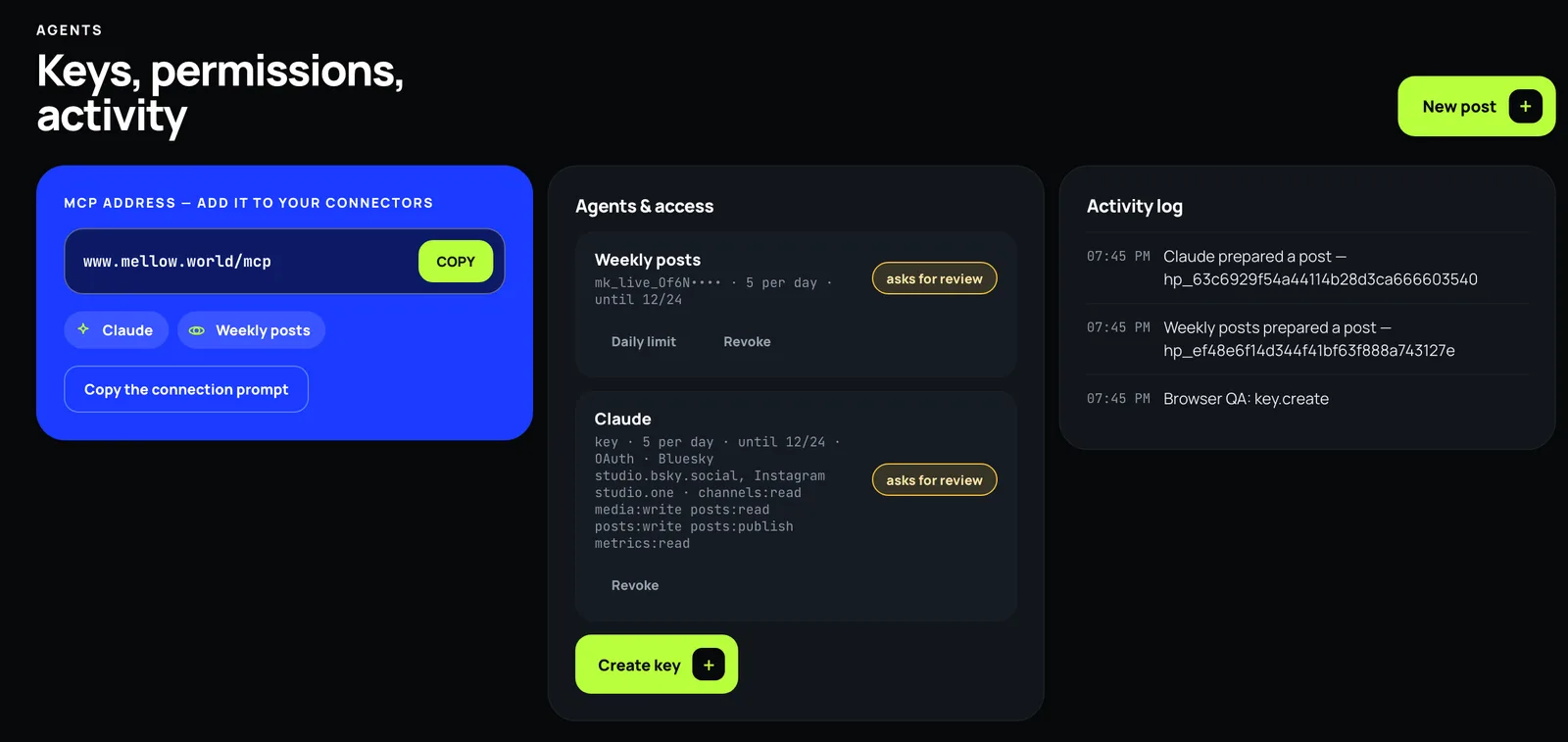
The limits you set for your own AI
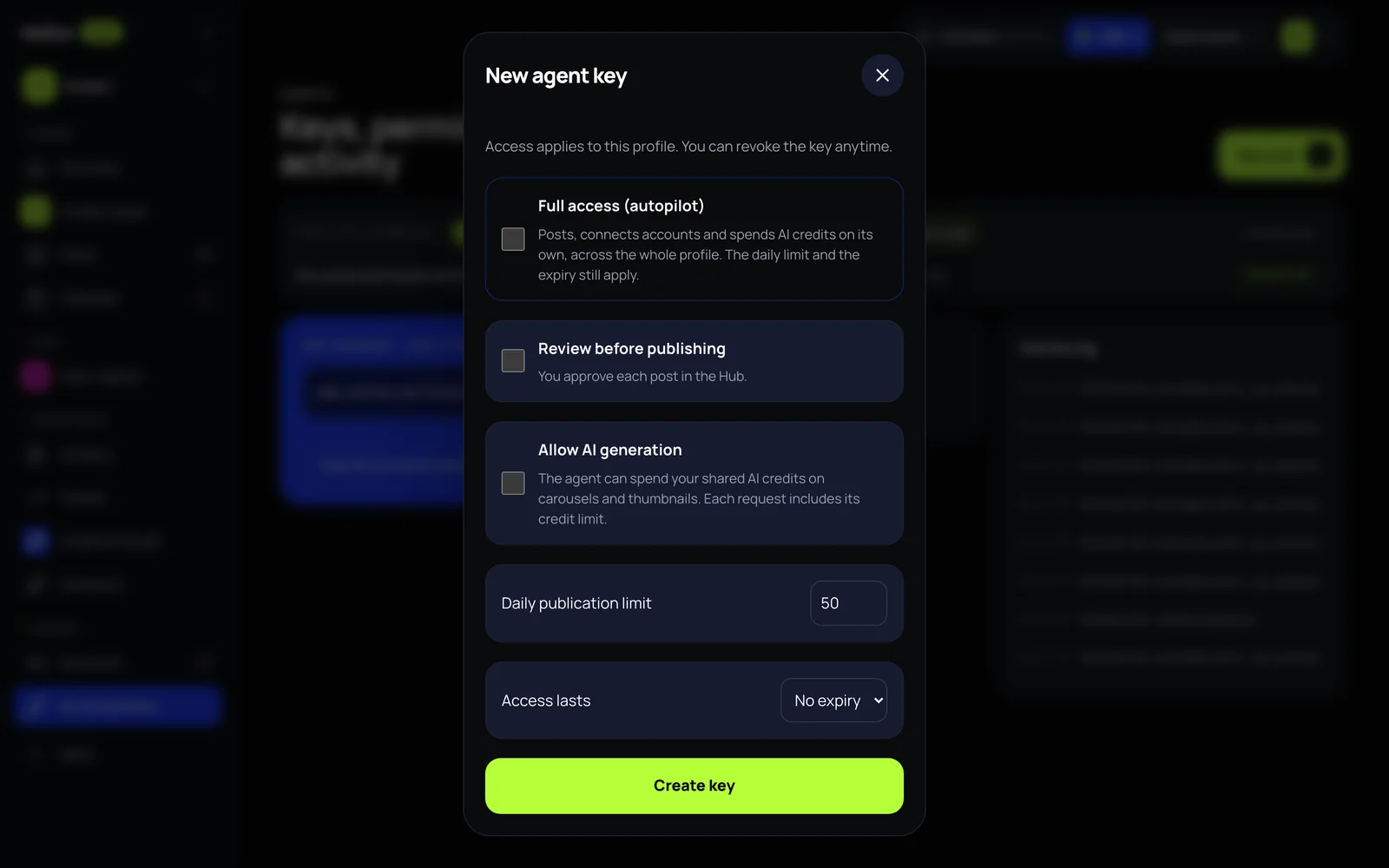
- Accounts. On Hub’s screen you tick the accounts the app may use, and whether it also gets the ones you connect later. A key made in AI connections covers the whole profile.
- The mode. With After I approve the AI only prepares: each post waits in Posts until you approve it, signed in, and no key or app can approve its own post. With Right away it publishes on autopilot, inside the limits below. The screen starts on Right away, so change it if you want to see each post first.
- A daily ceiling. From 1 to 1,000 posts a day, counted on the day a post goes out, so a month can be planned in one sitting. A request past the ceiling is refused, and the refusal is in the journal.
- An expiry. None, or up to 365 days. After it the app has to ask you again.
- AI credits. Spending them on pictures is a separate tick that is never made for you, with a daily ceiling of its own: 200 credits unless you change it.
- The journal, and Revoke. Every action is in the Activity log with its outcome. Revoke takes effect on the AI’s next request; posts it had already scheduled stay scheduled until you cancel them.
What your AI can do through Hub
Hub’s server offers 53 tools. These are the ones a social media manager uses, under their real names:
| What it does | Tools | Worth knowing |
|---|---|---|
| Learns what it may do | whoami, list_channels, list_platforms | Its mode, its accounts and how many posts it has left today |
| Finds what is taking off in your topic | trends_search, trends_radar | Short videos on YouTube, TikTok and Instagram, with the networks’ own figures |
| Checks a post and brings its media in | validate_post, preview_post, register_media, request_upload_url | The check returns every problem at once and sends nothing |
| Publishes, schedules, changes, cancels | create_post, update_post, reschedule_post, cancel_post, retry_post | In review mode a new post waits for you, and a post you approved and scheduled can’t be reworded or moved |
| Reads how posts did | get_post, list_posts, post_results, get_metrics, account_overview | Each network’s result and link; views and likes where the network reports them |
| Sets Instagram auto-replies by keyword | list_autoreplies, create_autoreply, update_autoreply, delete_autoreply, catch_up_autoreplies | In review mode a rule is saved switched off, for you to turn on |
| Shows its own record | read_audit_log | The same journal you read in AI connections |
| Makes pictures in Creative Studio | studio_quote, studio_generate, studio_thumbnail, studio_export | Only with the AI credits tick; it quotes the cost before it spends |
14 of the 53 tools belong to Creative Studio’s picture making and to trend breakdowns, and work only for a connection you allowed to spend AI credits. The clicks for each assistant are in the Claude guide and the ChatGPT guide.
What it does not do
- It does not post without your permission. With no key and no approved app, a request to Hub is refused. A key cannot make another key.
- It does not sign in for you. An AI can hand you the link that connects an account; you open it and sign in on the network’s own page.
- It does not talk to people for you. The Assistant does not answer your direct messages. Instagram auto-replies answer a keyword with the words you approved (how they work).
- It does not invent results or promise reach. The figures are the networks’ own, and where one reports nothing it says so. It is told not to make up a posting time or a growth figure.
- It does not delete what is already live. A post can be cancelled before it goes out; after that you remove it on the network.
- It does not like, follow or comment on other people’s posts. There is no tool for it.
- It does not make a post go out on every network. A network can still refuse one, and the post says why (what happens then).
What has happened so far: from 25 October to 23 November 2026, 24 people approved an AI app on Hub’s screen, 23 of them Claude, and 16 of the 39 approvals chose After I approve; 6 keys were made. Agents worked in 23 profiles: they created 528 posts in 13 of them, ran 385 trend searches and set 52 auto-reply rules, and 12 of their requests were refused and journaled. Mellow’s own profiles are counted in, and they are the largest part of it: Mellow’s own account created 403 of those posts, and three accounts created 522 between them. In the same days 7 profiles asked Hub’s own Assistant 42 questions.
Try it on your own accounts
The Assistant and AI connections are part of every Mellow Hub plan, with Trends, Creative Studio and publishing to 10 networks. New accounts start with a 7-day trial.
Open the AssistantQuestions
Can ChatGPT post to Instagram?
Not by itself. OpenAI’s help says ChatGPT works with other services through connected apps, and the apps that page names include no social network (read 24 November 2026). So something has to hold your Instagram connection. Instagram’s own app schedules posts, and Meta Business Suite, which is free, schedules them from a computer; both are done by hand. With Mellow Hub added to ChatGPT as a custom MCP server, ChatGPT gets the tools to check, schedule and publish to a professional Instagram account: on 5 October 2026 a ChatGPT connection scheduled five Instagram carousels on one of Mellow’s own profiles. OpenAI offers custom servers with write actions on Business, Enterprise and Edu, on the web; on Pro a custom server can only read.
Is there an AI that posts to social media for me?
Yes, on two conditions: a publishing service has to hold your accounts, and you have to give the AI permission. The networks’ own tools schedule what you make: Meta Business Suite is free, you create and schedule posts in it, and its page says AI can help with content ideas. In Mellow Hub the Assistant prepares a post and publishes it after your yes, and a connected Claude or ChatGPT publishes to the accounts you ticked, up to the daily ceiling and until the expiry you chose: each post after your approval, or on autopilot.
What does an AI social media manager actually do?
The routine. It drafts a caption for each network’s limit, checks the post against the network’s rules before it is sent, schedules it and reads back how your posts did. It cannot sign in to your accounts, it does not know facts you have not told it, and it should not decide what your brand says. In Mellow Hub the checks are plain software, not a model’s guess: a post that breaks a network’s rule is stopped before anything is sent.
Can AI run my social media on autopilot?
The networks’ own automation is scheduling: Instagram’s app holds a post you made until its time, up to 25 a day and 30 days ahead, and Meta Business Suite does the same from a computer. An AI on autopilot goes further, within limits you set. In Mellow Hub, autopilot means a connected AI publishes without asking you first, but only to the accounts you ticked, up to 1,000 posts a day at most (you choose the number), until the expiry you chose, with every action in the journal. Choose After I approve and each post waits for you instead. Each network’s own rules still apply to every post, whoever wrote it.
Can Claude post to Instagram?
Through a connector, yes. Anthropic’s help says custom connectors work on Free, Pro, Max, Ultra, Team and Enterprise, with Free limited to one (read 24 November 2026). Add Mellow Hub as a custom connector, approve the accounts on Hub’s screen, and Claude can check, schedule and publish to them. Without a connector Claude can still write the caption, and you post it in Instagram’s app.
Does the AI see my passwords?
No. You sign in to each network on that network’s own page when you connect it in Hub, and the AI signs in to Hub, not to the network. An agent that tries to connect an account only gets a link for you to open. Bluesky asks for an app password, and you type that into Hub yourself, never into a chat.
How do I stop an AI that is posting for me?
Open AI connections and press Revoke beside the key or the app: its next request is refused. Posts it had already scheduled stay scheduled, so cancel those in Posts if they should not go out.
Is there a free AI social media manager?
Parts of one. Meta Business Suite is free for Facebook and Instagram. ChatGPT and Claude can write posts without a paid subscription, and Claude’s Free tier allows one custom connector, so it can reach a publishing service. Mellow Hub itself has no free tier: every plan starts with a 7-day trial that takes a card.
Will it answer comments and messages for me?
By keyword, on Instagram: you write the keyword and the reply, and when a comment contains the word, Hub answers with your words, in public and in a private message. A connected AI can set those rules up for you; in review mode a rule it makes stays switched off until you turn it on. The Assistant does not write replies to people for you.
Will an AI social media manager grow my account?
Nobody can promise that, and Hub does not. It takes the routine off you and shows the networks’ own figures for each post. What people watch and share is still decided by the post.
Related
- Post to social media from ChatGPT (who can add Hub, and every click)
- Post to social media from Claude (on any plan)
- The social media MCP server behind it (for developers and other clients)
- An approval workflow for posts an AI prepared
- Can an AI agent manage your social media accounts? (which parts of the job, network by network)
- Is social media automation allowed?
- Letting an AI agent post: the limits we set, and what still went wrong
- ChatGPT on autopilot for a social profile: what it posted and what we changed
- Viral video finder (what the trend tools read)
- Mellow Hub