Scheduled post didn’t post? Why it failed on each network, and what to do
Why a scheduled post didn’t go out on Instagram, YouTube, Threads or another network, what each network’s help says, and what Mellow Hub does next.
By Mellow · UpdatedWhy didn’t my scheduled post post?
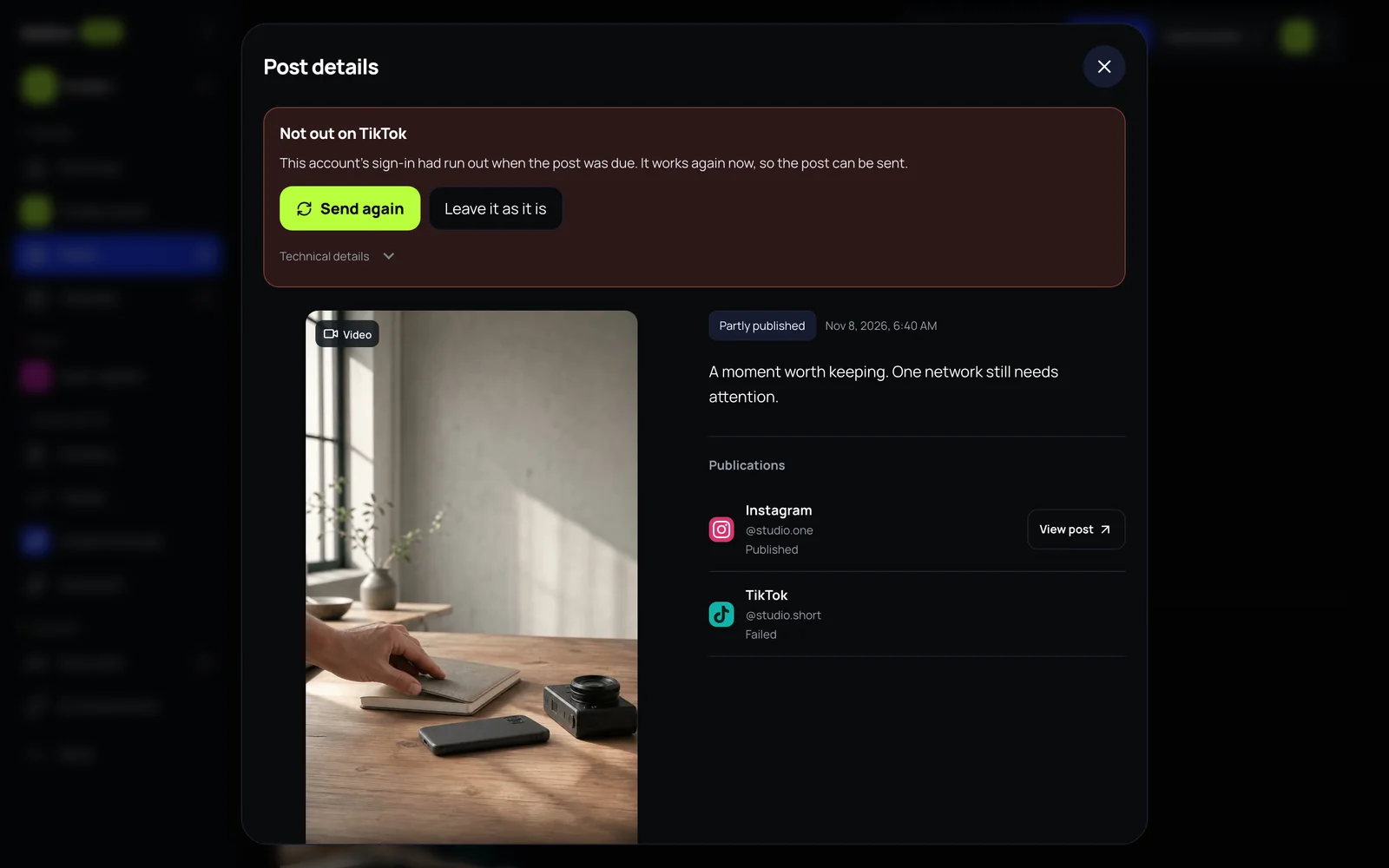
A scheduled post that didn’t go out was refused by the network at its time, or never reached it: the account’s sign-in had run out, the network was busy or at its limit, it could not use the file, or the service sending the post was down. The networks’ own help says little. Instagram’s Help Center has no page on it; Meta Business Suite’s names four causes and a Publish now button; YouTube’s names one, a strike. In Mellow Hub every post says which of up to 10 networks did not take it and why, in one sentence. Hub tells 11 kinds of refusal apart and sends 6 of them again by itself. The rest it leaves to you, with Send again and Leave it as it is. After a sign-in that had run out, nothing goes by itself: you send the missed posts now, 10 minutes apart on each account, from a time you pick, or not at all.
What the networks’ own help says
| Where it was scheduled | What its help says | What it tells you to do |
|---|---|---|
| Instagram app | No page on a scheduled post that failed. Scheduling needs a public account, up to 25 posts a day and 30 days ahead; product tagging, collaborative posts, sponsored posts and fundraisers can’t be scheduled. | Profile, Menu, Scheduled content: Reschedule or Share now. |
| Meta Business Suite | A scheduled post may not publish at its time. Four causes: no access to publish, an unresolved issue with the Instagram account, a hacked account, a system error. | Content, Scheduled, read the error, Publish now. For Instagram, log in to the app and follow any notice first. |
| YouTube Studio | With a Community Guidelines strike, a scheduled video won’t publish during the penalty period and is set to private. | Reschedule it when the freeze ends. |
| Mellow Hub | Which network did not take the post and why, in one sentence, with the network’s own words under Technical details. | Depends on the reason: the table below. |
All three pages were read on 24 November 2026; Instagram’s Help Center was searched for “scheduled post failed” that day. For Threads, what its own pages say is in Threads scheduled post not working?
Why a network refuses a post, and what Hub does
Every refusal Hub reads is one of these kinds. The two right-hand columns are the sentences Hub itself gives you, and an AI agent working for you, for that kind.
| What happened | What Hub does | What is left to you |
|---|---|---|
| Sent again by itself | ||
| Our posting service was down | Sends it again by itself over the next hours, waiting longer each time (10 min, 30 min, 1 h, 3 h, 8 h): an outage of the provider can last most of a day. | Nothing, unless every try fails: then Send again. |
| The network was busy or did not answer | Sends it again by itself, up to three times within the hour. | Nothing, unless every try fails: then Send again. |
| The network could not process the file | Sends it again by itself, up to three times within the hour. | Nothing, unless every try fails: then Send again, or check the file. |
| The network gave no reason | Sends it again by itself, up to three times within the hour. | Nothing, unless every try fails: then Send again. |
| The network’s limit on posts was reached | Waits for the network’s limit to start over and sends it then, up to three times. | Nothing: the post shows when it will go out. |
| YouTube’s daily upload limit was reached | Waits for YouTube’s daily limit to start over and uploads it then, up to three days. | Nothing: the post shows when it will go out. |
| Depends on you | ||
| The account’s sign-in had run out | Keeps the post and sends nothing by itself. Once the account is signed in to again, the home screen offers it: send now one after another, pick a time, or leave it. | Sign in to the account again, then choose on the home screen. |
| Instagram gave the reel no trial | Sends the reel again as an ordinary one only if the post says that is all right ("Post as an ordinary reel if the trial is not available"); otherwise it stands as failed and nothing is posted. | Nothing if the post says so; otherwise turn the setting on, or post again when Instagram gives trial reels. |
| Shown at once | ||
| The network could not use the file | Shows the failure with the network’s own words. | Change the file, or leave the post without this network. |
| The network never confirmed the post | Shows the failure. It is not sent again by itself: the post may be out. | Look at the account, then Send again or leave it. |
| The network refused it for another reason | Shows the failure with the network’s own words. | Change what the network names, then Send again, or leave it. |
These waits are for posts Hub hands to its posting service. A post Hub publishes through its own Instagram or YouTube route is tried again inside that route, a limited number of times, before it counts as failed.
One refusal reads as a sign-in and is not lifted by signing in again: Instagram’s own security check. Hub says: “Instagram has paused apps on this account until you open Instagram, log in and follow its instructions. Do that first, then reconnect the account here and send the post again.” It is what Meta’s Business Suite page advises too.
When a post didn’t go out in Hub, step by step
- Open Mellow Hub. Posts that did not go out everywhere are listed at the top of Overview and of Posts.
- Open the post. Under “Not out on” and the network’s name, read why in one sentence; the network’s own code and words are under Technical details.
- If the account’s sign-in had run out, press Sign in to … again on the post, with the network’s name: it opens Accounts, where you sign in.
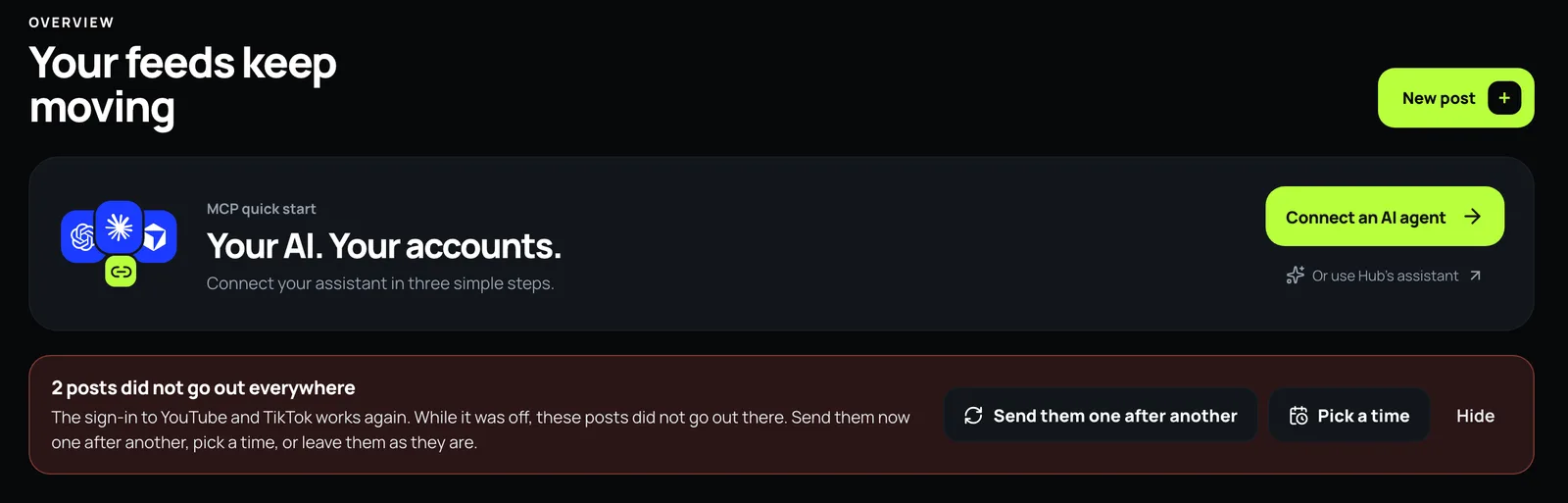
- Back on Overview, choose what happens to the posts that missed it: Send them one after another, Pick a time, or leave them as they are.
- For any other reason, change what the network names, if it names something, then press Send again, or Leave it as it is.
After you sign in again, you choose
- While an account’s sign-in is off, every post due for it is refused the same way. Hub keeps them and sends nothing by itself, then or later.
- Once the account works again, Overview says so in plain words and offers three answers: Send them one after another (oldest first, 10 minutes apart on each account), Pick a time (the same queue from the time you choose), or leave them as they are.
- Before you send, each post you ticked says when it will go out, and you can untick one that went out another way.
- A post meant for an account you have since disconnected goes to another account of the same network only if you tick that account.
What it does not do
- It cannot make a network take a post. A file the network cannot use, or a post it refuses for its own rules, needs a change from you.
- It cannot lift Instagram’s security check or a YouTube strike. Only the account’s owner can, in the network itself.
- It does not post a refused trial reel as an ordinary one unless you turned that on for the post.
What has happened: from 25 October to 23 November 2026, 542 network posts went out through Hub and 17 stand as failed, Mellow’s own profiles included. 8 of those 17 were our posting service being down, and 6 a sign-in that had run out.
Schedule your next post where a failure is told in words
The composer and Posts are part of every Mellow Hub plan, with publishing to 10 networks, Trends and Creative Studio. New accounts start with a 7-day trial.
Open the composerQuestions
Why didn’t my scheduled post post?
The network refused it at its time, or never got it. Instagram’s Help Center has no page on a scheduled post that failed. Meta Business Suite’s troubleshooting page names four causes: no access to publish, an unresolved issue with the Instagram account, a hacked account, or a system error. In Mellow Hub the post itself says which network did not take it, why, in one sentence, and what you can do about it.
Why did my Instagram scheduled post fail?
Instagram doesn’t say: its Help Center has no page on it. Its scheduling page asks for a public account and says product tagging, collaborative posts, sponsored posts and fundraisers can’t be scheduled. Meta’s page for Business Suite says to log in to the Instagram app and follow any notice there first. Mellow Hub says the same when Instagram has paused apps on an account: “Instagram has paused apps on this account until you open Instagram, log in and follow its instructions. Do that first, then reconnect the account here and send the post again.”
My Meta Business Suite scheduled post failed. What do I do?
Meta’s page says: open Content, then Scheduled, look for the error message on the post, open it and click Publish now. If the post is for Instagram, log in to the Instagram app and follow any notice there first. If you can’t publish at all, the owner of the Page or account has to give you access.
Why didn’t my scheduled YouTube video publish?
YouTube Help names one reason: with a Community Guidelines strike, a scheduled video won’t publish during the penalty period; it is set to private, and you reschedule it when the freeze ends. Through YouTube’s API there is also a daily upload limit. Mellow Hub waits for it to start over and uploads the video then, and the post shows when it will go out.
Does Mellow Hub send a failed post again by itself?
For 6 of the 11 kinds of refusal it tells apart, yes: an outage of Hub’s own posting service, a busy network, a file the network could not process, a refusal with no reason, a network’s limit on posts and YouTube’s daily upload limit. You need to act only if every try fails. A sign-in that ran out and a trial reel Instagram refused depend on what you choose. The rest are shown at once, because sending the same post again would meet the same answer or risk a second copy.
I signed in again. Will the posts that missed it go out now?
Not by themselves, since 24 November 2026. Overview says the sign-in works again and that these posts did not go out there while it was off, and offers three answers: send them now one after another, 10 minutes apart on each account, oldest first; send them from a time you pick; or leave them as they are.
Can sending a post again publish it twice?
Send again goes only to the networks where the post is not out; where it is already out, nothing changes. When a network never confirmed a post, Hub does not send it again by itself, because it may be out: look at the account, then Send again or leave it.
Does every post go out through Mellow Hub?
No tool can promise that: the network decides. From 25 October to 23 November 2026, 542 network posts went out through Hub and 17 stand as failed, Mellow’s own profiles included. 8 of the 17 were our posting service being down, and 6 a sign-in that had run out.
Related
- Threads scheduled post not working? (what Threads’ own pages say)
- Where are your scheduled Instagram posts?
- Follow every post until it is out, and fix what did not go (Hub’s how-to)
- Instagram Reels scheduler with trial reels
- Threads scheduler
- Cross-post one video to every network
- Facebook Page scheduler for posts and Reels
- Instagram scheduler without a Facebook Page