Facebook Page scheduler: schedule posts and Reels from your computer
Schedule Facebook Page posts and Reels from a computer, alone or with the same post on Instagram. Meta Business Suite, the free way, first. Pages only.
By Mellow · UpdatedHow do you schedule Facebook posts from a computer?
You can schedule a post for a Facebook Page, not for a personal profile. Meta’s own scheduler is Meta Business Suite: it is free, runs in a browser, and schedules a Page’s posts, Reels and stories, a post from 20 minutes to 29 days ahead. No outside tool can post to a personal profile at all, because Meta’s API publishes to Pages only.
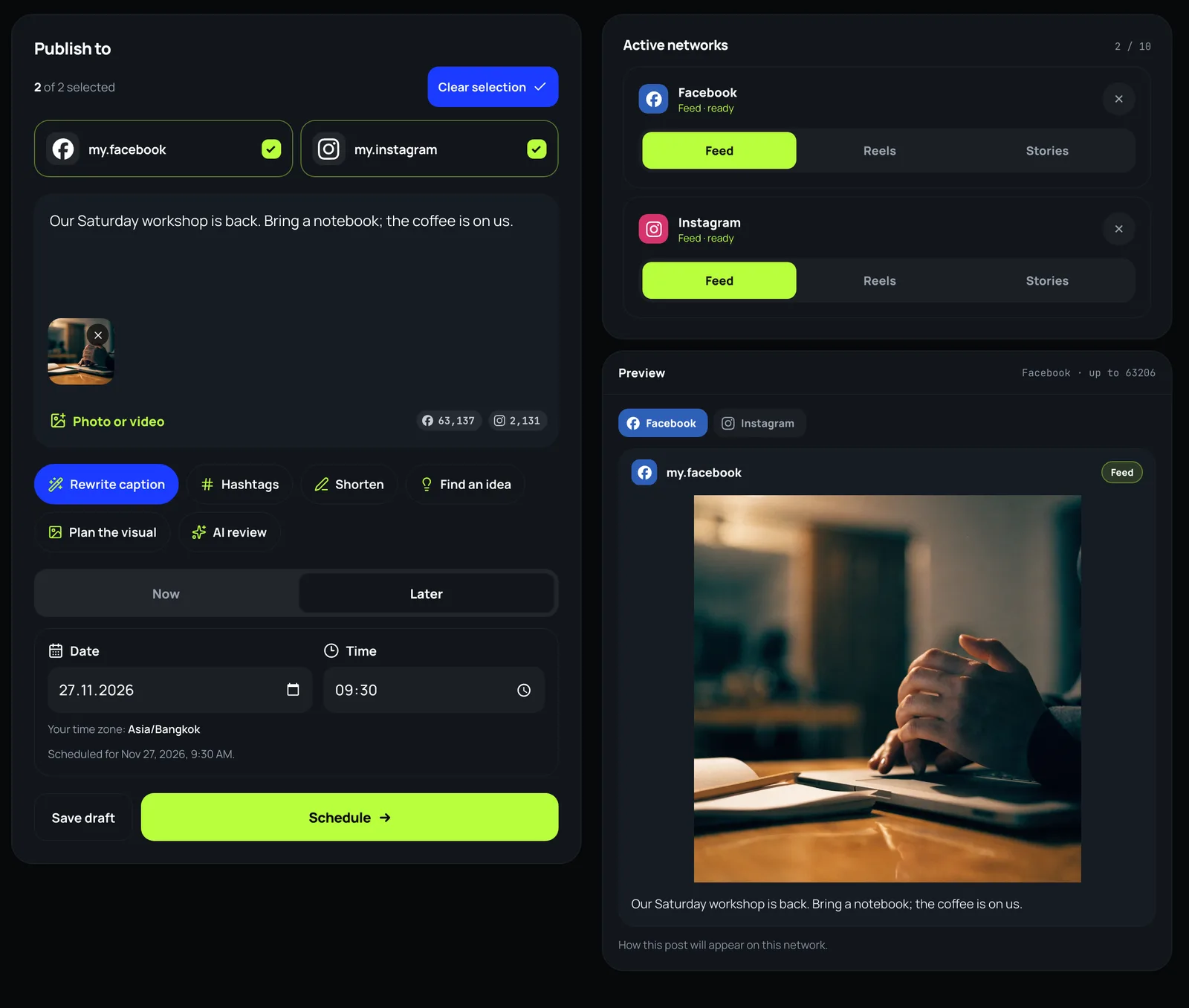
Mellow Hub’s composer is for when the same post should also go to Instagram and your other networks, up to 10 in one post, when an AI agent prepares your posts, or when you want every network on one calendar. Tick your Page, write the text, add up to 10 photos or one video, choose Feed or Reels on the Facebook card, then Later and a time: Hub publishes the post then, and keeps it on its Calendar until it goes out.
A Page, not a personal profile
- What an app can post to. Meta’s Pages API publishes a post on a Page, as the Page, for somebody who manages it. Its Reels guide says it plainly: “You can only publish Reels to Facebook Pages.”
- Why no tool posts to a profile. The permission that let an app post as a person was withdrawn in 2018 (Meta’s developer blog). Every scheduler since, Mellow Hub among them, posts to Pages.
- What Meta’s own help says. Facebook’s Help Centre gives the scheduling steps for a Page, through Meta Business Suite. Its pages about posts on your own profile, read on 24 November 2026, have none about scheduling one.
- If you only have a profile. Facebook says anyone with an account can create a Page. When you connect Facebook to Hub and Facebook shares no Page, Hub says so at once and asks for one.
Meta Business Suite and Mellow Hub, side by side
| What you want | Meta Business Suite | Mellow Hub |
|---|---|---|
| A Page post | Create post, then Scheduling options; 20 minutes to 29 days ahead | Feed: words alone, up to 10 photos, or one video, at the time you choose |
| A Reel | Create reel from a video or from photos, then schedule it | Reels: one video of 3 to 90 seconds |
| A story | Create story, up to 10 photos or videos, then Schedule | Offered, one photo or video each; not proven yet |
| The same post on Instagram | Cross-posting, when the Page and the Instagram profile are in one business portfolio | Tick both accounts; each has its own card and its own check |
| Other networks | Threads | Up to 10 networks in one post |
| A personal profile | No: a Page, an Instagram profile or a group | No: a Page only |
| What it costs | Free | Every plan, after a 7-day trial |
| Where a scheduled post waits | Planner, or Content, Posts and reels, Scheduled | Hub’s Calendar and Posts; on the Page once it is out |
Meta’s pages were read on 24 November 2026. Meta Business Suite needs a business portfolio that holds the Page, and the right to create content for it; its times are in your current time zone.
Schedule a Page post or a Reel, step by step
- In Accounts, connect Facebook: you sign in on Facebook’s own page and give Mellow Hub the Page you manage. A personal profile cannot be connected.
- Open Create a post and tick the Page. Tick your Instagram account too if the same post should go there.
- Write the text and add up to 10 photos or one video. Words alone are enough for a Page; Instagram needs a photo or a video.
- On the Facebook card keep Feed, or choose Reels for one video.
- Open Facebook in the Preview: it shows the text and the first photo as the post will be sent.
- Choose Later, pick the date and the time in your own time zone, and press Schedule.
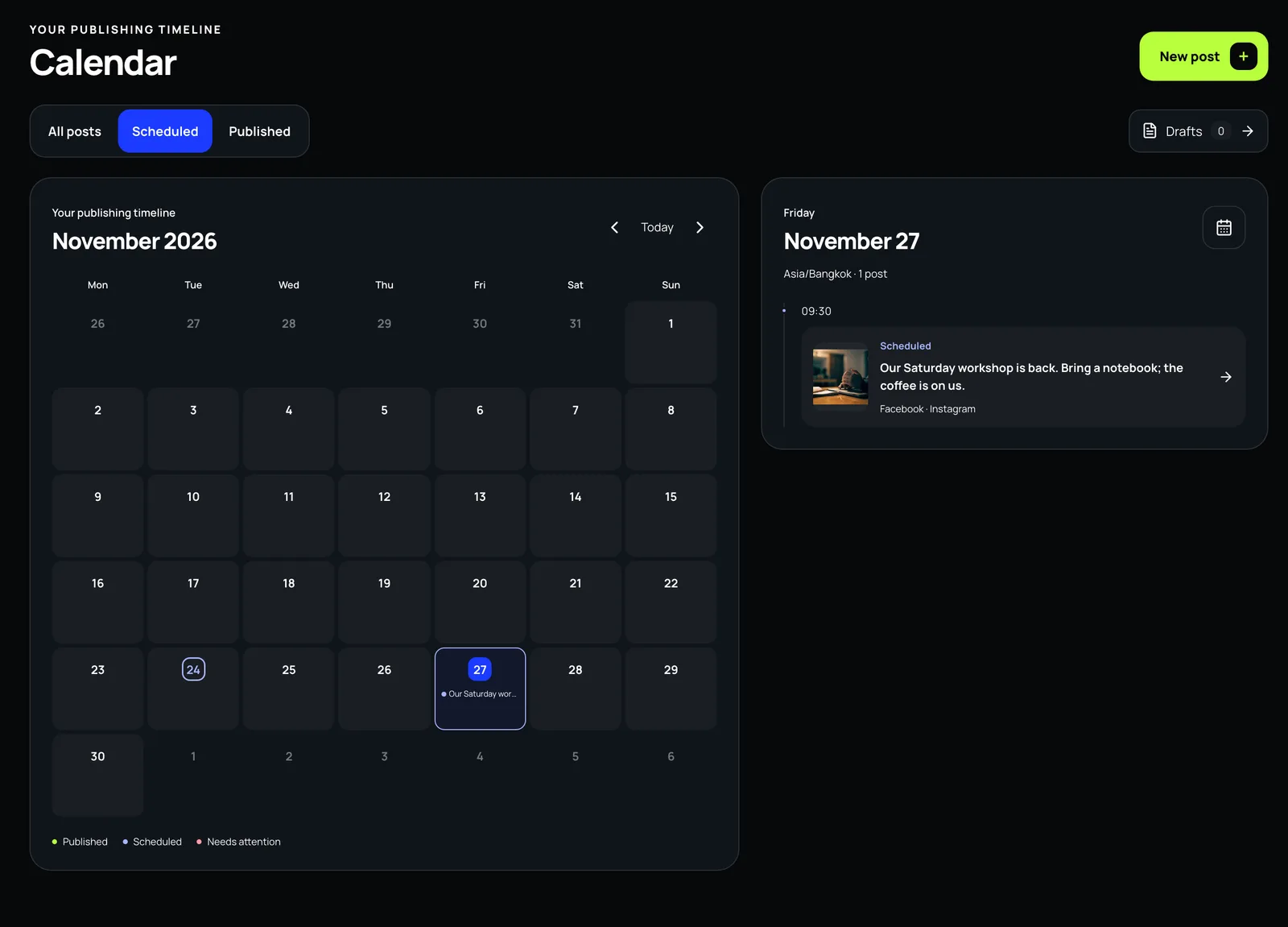
- Find the post on the Calendar or in Posts. Until it goes out you can edit it, change its time or cancel it.
Feed, Reels or Stories: what the Facebook card sends
- Feed is an ordinary Page post: words alone, up to 10 photos, or one video. The text may run to 63,206 characters. Meta publishes no figure for a Page post; that is the one Hub checks.
- Reels takes exactly one video and sends it through Facebook’s Reels API: 3 to 90 seconds, 9:16, at least 540 × 960 pixels (Meta). Hub reads the video’s length and frame and tells you when it is outside those limits. It does not refuse the post, because Facebook has the last word on a file. A longer video can go to Feed instead.
- Stories takes one photo or one video. The card offers it, and no Facebook story has gone out through Hub yet. We call it connectable, not proven; Meta Business Suite schedules stories today.
- One kind per post. Photos and a video together are refused before sending, and a Page post carries one video, not several.
See, change or cancel a scheduled post
- Calendar shows the month, with All posts, Scheduled or Published, and the chosen day’s posts with their time, their state and their networks. Times are in your device’s time zone.
- Posts sorts every post into Published, Scheduled, Drafts, Needs attention and Cancelled.
- Open a scheduled post to Edit post (it opens in the composer and is saved back onto itself), Change publication time or Cancel post, which asks first.
- It is not in Meta Business Suite’s Scheduled list while it waits. Hub and the service it publishes through keep the post and send it to Facebook at its time; they do not use the scheduling field of Facebook’s API, which takes 10 minutes to 30 days. Once the post is out, Hub links to it on Facebook.
The same post on Facebook and Instagram
- Tick the Page and the Instagram account. Each gets its own card, with Feed, Reels and Stories, its own tab in the Preview and its own check before anything is sent.
- Instagram needs a photo or a video and a professional account; a Page takes words alone. Hub says so before sending when a post with no file has Instagram ticked.
- One text serves both up to Instagram’s 2,200 characters. For a longer one, write Instagram its own caption under Network captions, press Rephrase, or keep Hub’s cut at the last sentence that fits.
- Photos: up to 10 on the Page and 10 on Instagram, which is stricter about a photo’s type and shape. The Instagram scheduler guide has its rules.
- A video: choose Reels on both cards. Instagram takes a reel of up to 15 minutes, Facebook’s Reels API up to 90 seconds; for a longer one keep Feed on the Facebook card.
- Each network answers for itself. One can go out while the other is refused, and the post says which, and why: what happens then.
- Meta Business Suite pairs the two for free when the Page and the Instagram profile are in the same business portfolio. Hub is for when the post also goes beyond Meta.
What Hub checks, and what Facebook decides
- Before sending, Hub refuses, with the reason: a post with neither words nor a file, more than 10 files, photos and a video together, a reel that is not one video, a story that is not one item.
- The pace: Facebook’s Reels API takes 30 reels from a Page in a moving 24 hours (Meta); that page gives no figure for a Page’s other posts. When Facebook refuses a post for a limit, Hub waits and sends it again.
- A file Facebook could not process, or no answer in time: Hub sends the post again by itself, and shows the failure only if every try fails.
- A sign-in that has run out: the post waits and nothing is sent. After you sign in again, Hub asks what to do with what was missed: send it now one after another, pick a time, or leave it.
What it does not do
- A Facebook Page you administer. Personal timelines cannot be published to through the API. Hub does not post to Facebook groups either.
- It does not edit. Meta Business Suite can build a reel from photos or change a reel’s audio; Hub sends the file you made.
- It does not promise reach or pick a time for you. It sends the post you made, at the time you chose.
What has gone out, and it is not much: from 25 October to 23 November 2026, 18 feed posts and 1 Reel went out through Hub on 2 Facebook Pages. 17 of the feed posts were one Page’s, on a single day, and 15 of those were scheduled ahead, each by less than 7 hours. Every feed post was photos, 7 at most. None of them carried Instagram in the same post, and no Facebook story has gone out yet. The pairing with Instagram is older and our own: from 5 September to 24 October 2026, Mellow’s own Page published 82 times through Hub, 32 of them in the same post as its Instagram account.
Schedule your next Page post
The composer and the Calendar are part of every Mellow Hub plan, with Trends, Creative Studio and publishing to 10 networks. New accounts start with a 7-day trial.
Open the composerQuestions
How do I schedule Facebook posts from my computer?
Meta’s own way is Meta Business Suite, which is free: switch to your Page, open Meta Business Suite, select Create post, write it, set a date and time under Scheduling options and select Schedule. A post can be set from 20 minutes to 29 days ahead. In Mellow Hub you tick the Page, write the post, choose Later and a time, and the same post can go to Instagram and your other networks too. Both work for a Page, not for a personal profile.
Can you schedule Facebook Reels?
Yes, for a Page. In Meta Business Suite select Create reel, add the video or the photos, and schedule it instead of sharing it now. In Mellow Hub add one video, choose Reels on the Facebook card and Later: the reel goes through Facebook’s Reels API, which takes 3 to 90 seconds, and the same video can go to Instagram Reels in the same post.
How do I post to Facebook and Instagram at once?
Meta Business Suite cross-posts between a Facebook Page and an Instagram profile when both are in the same business portfolio: choose both under Post to. In Mellow Hub tick the Page and the Instagram account in one post; each gets its own card, its own preview and its own check, and the post can go to your other networks as well. Instagram needs a photo or a video and a professional account.
Is there a free Facebook Page scheduler?
Yes: Meta Business Suite, Meta’s own tool, is free on desktop and in its app, and it schedules a Page’s posts, Reels and stories. Mellow Hub is paid: a 7-day trial with a card, then a plan. It is worth paying for only when you post beyond Facebook and Instagram, or when an AI agent prepares your posts.
Can I schedule a post on my personal Facebook profile?
Not with a scheduling tool: Meta’s API publishes to Pages only, and the permission that let apps post as a person was withdrawn in 2018. Facebook’s Help Centre gives scheduling steps for a Page and, on the pages we read on 24 November 2026, none for a profile. Anyone with a Facebook account can create a Page, and a Page can be scheduled for.
How far ahead can I schedule a Facebook post?
In Meta Business Suite, from 20 minutes to 29 days ahead. Mellow Hub keeps the post itself and sends it to Facebook at the time you chose, in your own time zone.
Where do I see my scheduled Facebook posts?
In Meta Business Suite: Planner, or Content, Posts and reels, Scheduled. That list holds what was scheduled in Meta Business Suite. A post scheduled in Mellow Hub waits on Hub’s Calendar and in Posts, where you can edit it, move it or cancel it, and it appears on the Page when it goes out.
Can I schedule Facebook stories?
In Meta Business Suite, yes: Create story, up to 10 photos or videos, then Schedule. Mellow Hub’s composer offers Stories for a Page, one photo or video each, but no Facebook story has gone out through Hub yet, so we do not promise it.
What happens if a scheduled Facebook post doesn’t go out?
The post says why, in plain words, on the Calendar and in Posts. Hub sends it again by itself when Facebook refused it for a limit, could not process the file or did not answer in time. If the Page’s sign-in has run out, nothing is sent until you sign in again; then Hub asks what to do with the posts that missed it: send them now one after another, pick a time, or leave them.
Can an AI agent schedule my Facebook posts?
Yes, for a Page. Claude, ChatGPT or another assistant can prepare and schedule Page posts through Mellow Hub’s MCP server, on the accounts, in the mode and up to the daily ceiling you set, and every action is recorded. The Facebook MCP guide has the steps.
Meta Business Suite is free. Why use anything else?
If you post only to Facebook and Instagram, it may be all you need, and it does more with reels and stories than Hub does. Mellow Hub is for when the same post also goes to LinkedIn, Threads, YouTube and the rest, when an AI agent prepares your posts, or when you want every network’s plan on one calendar.
Related
- Facebook post scheduler: how to schedule posts on a Page (Meta Business Suite, step by step)
- How do you cross-post between Facebook and Instagram?
- Instagram scheduler for feed posts and carousels
- Instagram Reels scheduler with trial reels
- Cross-post one video to every network
- Post to a Facebook Page from Claude or ChatGPT
- Scheduled post didn’t post? Why, on every network