Instagram scheduler: schedule feed posts and carousels from your computer
Schedule Instagram photos and carousels from a computer, check the preview first, and see every scheduled post on one calendar. The free ways too.
By Mellow · UpdatedHow do you schedule Instagram posts from a computer?
To schedule an Instagram post or a carousel from a computer, open Mellow Hub’s composer in any browser, add up to 10 photos, keep Feed on the Instagram card, check the preview and pick a time: Hub publishes the post then, and keeps it on its Calendar with its time until it goes out. Instagram’s own scheduler is in its phone app (a public account, up to 25 posts a day, up to 30 days ahead), and Meta Business Suite, which is free, schedules posts from a computer for a business or creator account. Hub adds three things: the same post to up to 10 networks at once, a preview of each network’s version, and a check of the caption (up to 2,200 characters) and the number of photos before anything is sent.
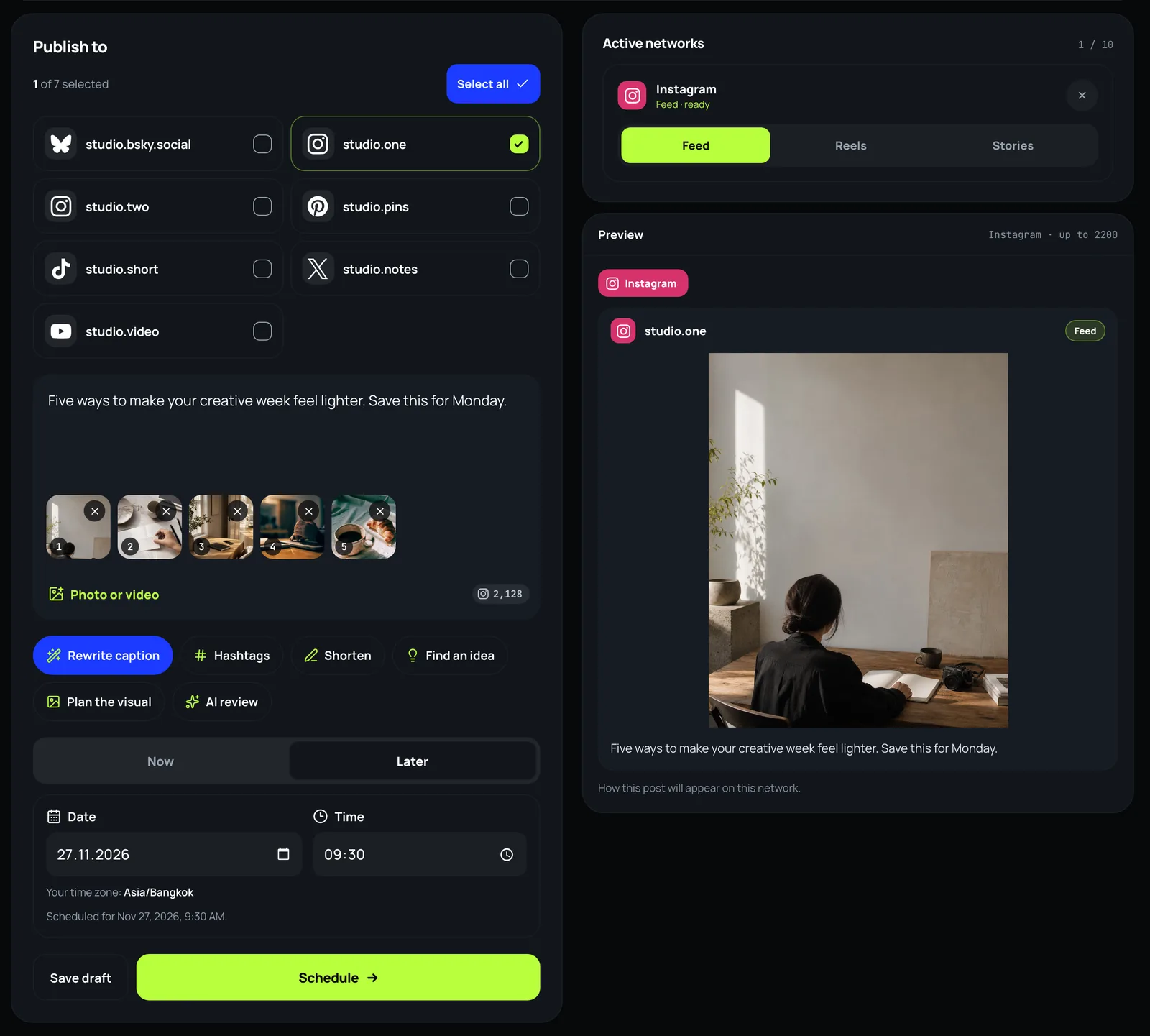
Four ways to schedule an Instagram post
| Way | What it costs | From a computer | Photos in one post | Where a scheduled post waits |
|---|---|---|---|---|
| Instagram app | Free | No: the steps are the app’s | Up to 20 photos and videos | Profile, Menu, Scheduled content |
| instagram.com | Free | Yes, to post now; no scheduling step | Up to 20 | Nothing waits: it posts at once |
| Meta Business Suite | Free | Yes, for a business or creator account | Up to 10 photos for Instagram | Planner, or Content, Posts and reels, Scheduled |
| Mellow Hub | Every plan, after a 7-day trial | Yes, in any browser, for a professional account | Up to 10, the same post to other networks too | Hub’s Calendar and Posts; on Instagram once it is out |
Instagram’s scheduling page and Meta’s Business Suite pages were read on 24 November 2026. Instagram asks for a public account and allows up to 25 scheduled posts a day, up to 30 days ahead; it says product tags, collaborative posts, sponsored posts and fundraisers can’t be scheduled yet. Meta says Business Suite is free on desktop and in its app.
Schedule a post or a carousel, step by step
- Open Create a post in Mellow Hub and tick your Instagram account. Tick any other account the same post should go to.
- Add the photos, up to 10, and drag them into the order they should be swiped. Two or more make a carousel.
- On the Instagram card, keep Feed.
- Write the caption, then open Instagram in the Preview: it shows the first photo as the feed frames it, and the caption as it will be sent.
- Choose Later, pick the date and the time in your own time zone, and press Schedule.
- Find the post on the Calendar or in Posts. Until it goes out you can edit it, change its time or cancel it.
Check the preview before it goes out
- The Preview beside the composer has a tab for each network you ticked. Instagram’s tab shows the account, Feed, the first photo framed as the feed frames a post (from 4:5 to 1.91:1), and the caption as it will be sent.
- It draws the first photo only. That is the one people see first: Instagram’s carousel page says the feed shows the first photo with a row of dots, and your profile shows it too.
- It does not draw your profile grid. The free grid planner shows how your next posts will sit there.
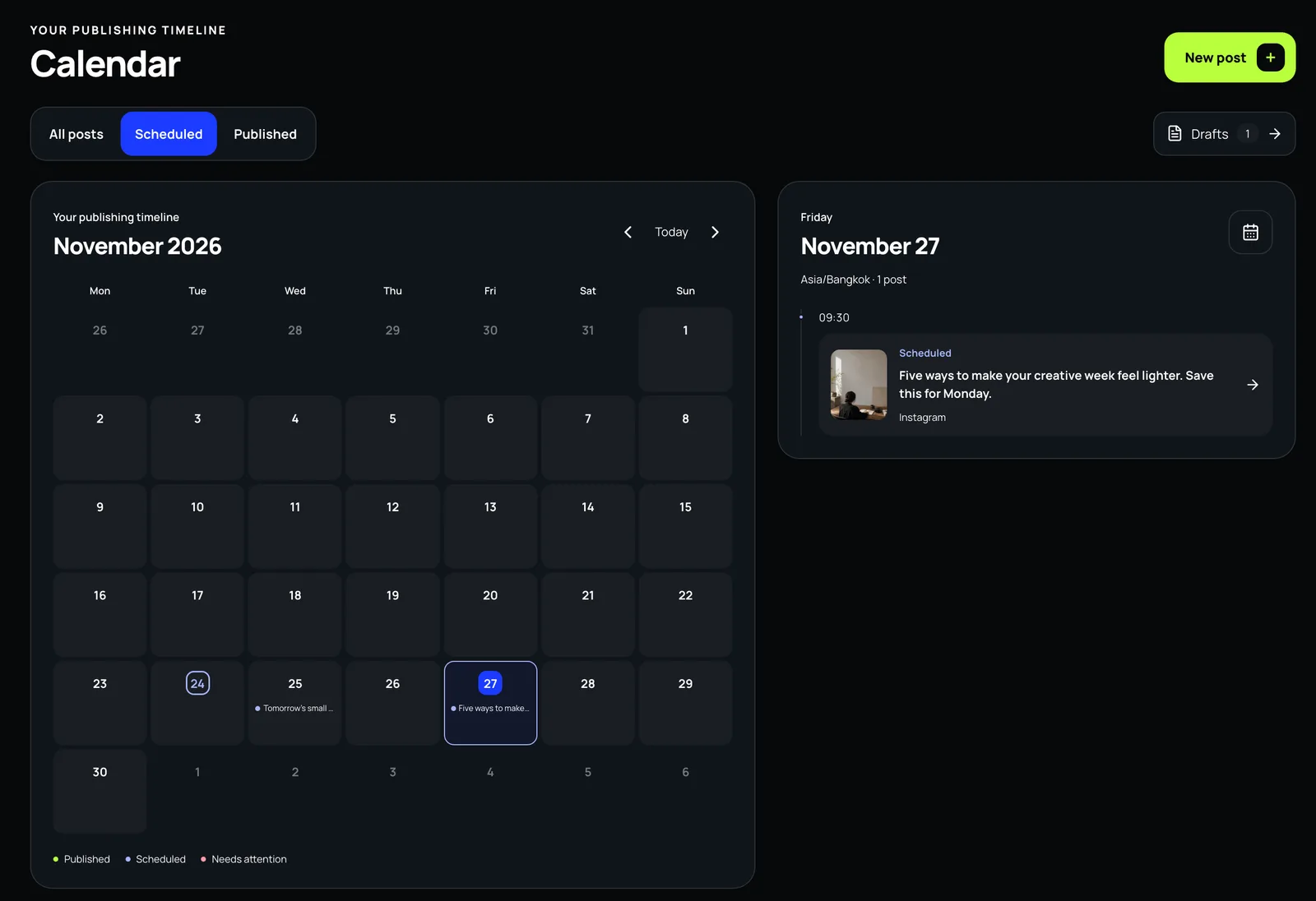
See, change or cancel a scheduled post
- Calendar shows the month, with All posts, Scheduled or Published, and the chosen day’s posts with their time, their state and their networks. Times are in your device’s time zone.
- Posts sorts every post into Published, Scheduled, Drafts, Needs attention and Cancelled; a carousel shows how many photos it has.
- Open a scheduled post to Edit post (it opens in the composer and is saved back onto itself), Change publication time or Cancel post, which asks first.
- Instagram’s own Scheduled content does not list it. Instagram’s API has no field for a time (Meta’s publishing guide), so Hub keeps the post and sends it at its time. Once it is out, the post links to it on Instagram.
What Hub checks, and what Instagram decides
- The number of photos: up to 10 in one Instagram post, and more is refused before sending, with the reason. Meta’s API takes 20 since 20 October 2026, but the service Hub publishes through keeps only the first 10 of a carousel and drops the rest without a word, so Hub stops there.
- The caption: up to 2,200 characters on Instagram, and every other network’s own limit. More than 5 hashtags gets a note, since Instagram allows 5 in a post.
- The pictures: Hub does not open the file; Instagram judges it when it fetches it. Its API takes JPEG only, from 4:5 to 1.91:1, up to 8 MB, and crops every photo of a carousel to the first one’s shape, so 1080 × 1350 (4:5) goes through whole. The free image converter saves a PNG, WebP or HEIC as a JPG.
- The pace: Instagram takes 100 API-published posts from an account in a moving 24 hours, a carousel counting as one (Meta). When it refuses a post for that limit, Hub waits and sends it again.
- A sign-in that has run out: the post waits and nothing is sent. After you sign in again, Hub asks what to do with what was missed: send it now one after another, pick a time, or leave it.
What it does not do
- A professional (Business or Creator) Instagram account. A personal account cannot publish through any API.
- One video posted to the feed goes out as a reel: that is how Instagram’s API publishes a single video. Reels and trial reels have their own guide, and so do stories.
- It does not promise reach or pick a time for you. It sends the post you made, at the time you chose.
What has gone out: from 25 October to 23 November 2026, 58 photo carousels of 5 to 10 photos went out through Hub on 4 Instagram accounts, Mellow’s own among them. 35 of them had 10 photos, and 54 were scheduled ahead.
Schedule your next carousel
The composer and the Calendar are part of every Mellow Hub plan, with Trends, Creative Studio and publishing to 10 networks. New accounts start with a 7-day trial.
Open the composerQuestions
How do I schedule Instagram posts from my PC?
Instagram’s own scheduler is in its phone app: its Help Center gives the app’s steps even on its computer page, and instagram.com posts from a computer with no scheduling step. On a PC, Meta Business Suite, which is free, schedules posts for a business or creator account: Create post, your Instagram profile, up to 10 photos, then Scheduling options. A tool that publishes through Instagram’s API does it too: in Mellow Hub you add the photos, keep Feed, choose Later and a time, and Hub publishes the post then.
Can you schedule a carousel on Instagram?
Yes. Instagram’s app schedules carousel posts for a public account, with up to 20 photos and videos in one. Meta Business Suite takes up to 10 photos for Instagram. Mellow Hub schedules carousels of up to 10 photos, and the same post can go to your other networks at the same time.
How do I see scheduled posts on Instagram?
In the Instagram app: Profile, Menu, then Scheduled content, where each post has Delete, Edit post, Reschedule and Share now. In Meta Business Suite: Planner, or Content, Posts and reels, Scheduled. A post scheduled in a tool is in neither list until it goes out, because Instagram’s API has no field for a time. In Mellow Hub it waits on the Calendar and in Posts, where you can edit it, move it or cancel it.
Can I preview an Instagram post before posting?
Instagram shows the crop, the filters and the caption while you make the post, and Meta Business Suite shows how it will look in the Facebook and Instagram feeds. Mellow Hub’s Preview shows the first photo as Instagram’s feed frames it and the caption as it will be sent, network by network. None of them draws your profile grid; the free grid planner does.
Is there a way to auto post to Instagram?
Yes. A post scheduled in Instagram’s app or in Meta Business Suite goes out by itself at its time, and so does one scheduled in a tool that publishes through Instagram’s API, Mellow Hub among them. A professional (Business or Creator) Instagram account. A personal account cannot publish through any API.
Why does Mellow Hub take up to 10 photos when Instagram allows 20?
Meta’s API has taken 20 items in a carousel since its guide of 20 October 2026, but the service Hub publishes through still keeps only the first 10 and drops the rest without a word. So Hub stops at 10 and says so before anything is sent, and no photo goes missing from a post. The number goes up only when that service sends more.
Can I schedule Instagram posts with a personal account?
In Instagram’s app, yes, if the account is public. Meta Business Suite needs a business or creator account, and so does every tool that publishes through Instagram’s API, Mellow Hub included.
Do I need a Facebook Page to schedule Instagram posts?
Not for Mellow Hub: it connects a professional account with Instagram’s own login, with no Page. Which tools still ask for one, and what stays on the Facebook-login route, is in the guide on scheduling Instagram without a Facebook Page, linked below.
What happens if a scheduled post doesn’t go out?
The post says why, in plain words, on the Calendar and in Posts. Hub sends it again by itself when Instagram refused it for its limit or did not answer in time. If the account’s sign-in has run out, nothing is sent until you sign in again; then Hub asks what to do with the posts that missed it: send them now one after another, pick a time, or leave them.
Meta Business Suite is free. Why use anything else?
If you post only to Instagram and Facebook, it may be all you need. Mellow Hub is for when the same post also goes to LinkedIn, Threads, X and the rest, when an AI agent prepares your posts, or when you want every network’s plan on one calendar.
Related
- How do you schedule Instagram posts? (the app and Meta Business Suite, step by step)
- Where are your scheduled Instagram posts?
- Can you preview an Instagram post before you publish it?
- Instagram Reels scheduler with trial reels
- Instagram Story scheduler
- Facebook Page scheduler for posts and Reels
- Instagram grid planner: plan the grid, then post it in order
- Instagram scheduler without a Facebook Page
- AI Instagram carousel generator
- A social media content calendar