Bulk schedule social media posts: a month in one sitting, with Claude or a CSV
Mellow Hub has no CSV upload: Claude schedules a month of posts one by one within your limits. Which tools take a CSV, and when to use one.
By Mellow · UpdatedHow do you bulk schedule social media posts?
Mellow Hub has no CSV upload and no bulk button in its cabinet. The way to schedule a month in one sitting with Hub is an AI assistant such as Claude, connected in AI connections: you paste a list of dates, networks and captions, it checks every post with validate_post and then makes each one with create_post and a time, inside the accounts, the mode, the daily ceiling (1 to 1,000 posts) and the expiry you set. A post counts against the ceiling on the day it goes out, so a month of two posts a day fits a limit of two. If you already have a finished spreadsheet, a CSV tool is the better choice: Buffer, ContentStudio and HubSpot document one, and Hub does not.
Ways to bulk schedule, side by side
| Way | You give it the posts as | How many at once | What its page says it leaves out |
|---|---|---|---|
| Buffer | A CSV per channel, on every plan, the Free tier included | Up to 10 a channel on Free, up to 100 on paid plans | Videos, reels and carousels: text and single-image posts only; posts over the limit are skipped without an error |
| ContentStudio | A CSV from Publisher, Automations, Bulk Schedule | Up to 500 | The page names no plan; you review and finalize the posts before they are scheduled |
| HubSpot | A CSV or spreadsheet file | Up to 300 a file, from up to 50 accounts | Needs Marketing Hub Professional or Enterprise |
| Meta Business Suite | One post at a time: its page describes creating a post and choosing a date and time | The page describes one | The page mentions no CSV or bulk step |
| Mellow Hub with Claude | Pasted text: a date, networks and a caption per post | One create_post per post; as many as the daily ceiling allows on each day | No file import. A Hub plan after a 7-day trial, and an assistant that can add a connector |
The help pages of Buffer, ContentStudio, HubSpot, Meta and Anthropic were read on 24 November 2026. A tool may have changed since: check its page for the networks and the plan.
When a CSV tool is the better choice
- You have the spreadsheet already, with finished text and one network per row. A CSV upload takes it as it is, and Hub would make you paste it.
- You want hundreds of posts at once. ContentStudio’s page says up to 500 in one go. Hub makes one post per call, and each day has its own ceiling.
- You do not want an assistant near your accounts. A CSV tool does exactly what the file says and nothing else.
- The posts are plain text or one picture each. That is all Buffer’s CSV takes, and on its Free tier it costs nothing.
Hub is for when the month is not a spreadsheet yet: you have ideas and rough dates, you want each caption fitted to its network before anything is made, or the same plan goes to LinkedIn, Bluesky, X, Threads and the rest with each network’s limits checked.
Schedule a month in one sitting, step by step
- Connect the accounts in Accounts. You sign in on each network’s own page: no assistant can do that step for you.
- Add Mellow Hub to Claude as a custom connector (the clicks are in the Claude guide) and approve the access on Hub’s screen: the accounts, Right away or After I approve, the posts a day and how long the access lasts.
- Paste the prompt and the table below, with your own dates, networks and captions.
- Let Claude call whoami and list_channels. It reports which channels it may use and how many posts it has left today.
- Read the problems validate_post found for each row, and fix the table or the captions. Nothing has been created yet.
- Let it create the posts, one create_post each, then read what list_posts returns against your table.
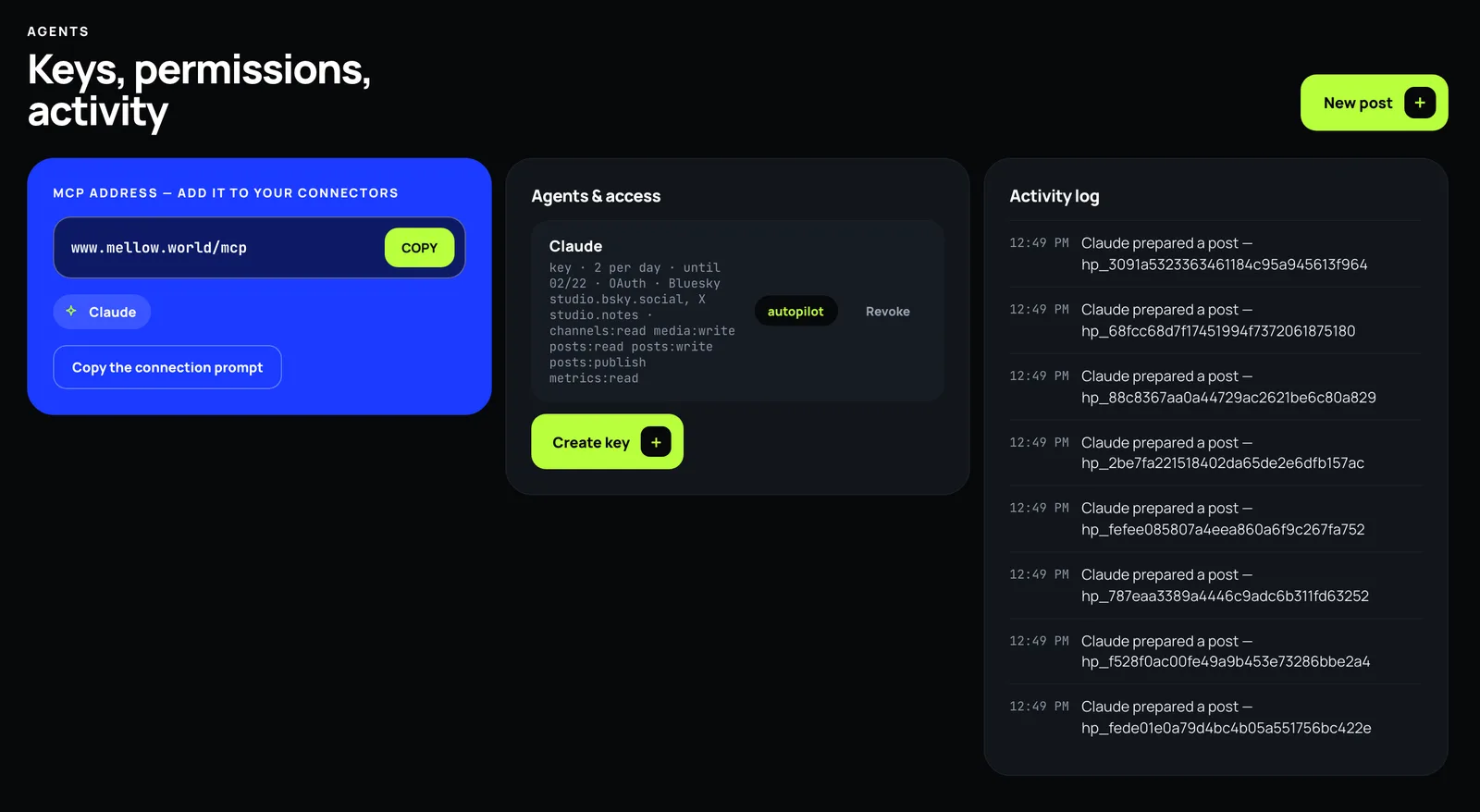
- Open Calendar and Posts to see the month. Until a post goes out you can edit it, move it or cancel it.
A worked example you can copy
A made-up bookkeeper plans December: ten posts, on Tuesdays and Thursdays, to LinkedIn and Bluesky. Paste this into Claude, and change the dates, the networks and the captions to yours. Every caption is shorter than Bluesky’s 300 characters, the shortest limit it meets here.
Use Mellow Hub. First call whoami and list_channels, and tell me which channels you may use and how many posts a day.

Then schedule the posts in the table below, one create_post each. Use the caption word for word. scheduledAt is the Date at 09:30 Europe/London. "LI" is my LinkedIn channel, "BS" my Bluesky channel.

Before you create anything, run validate_post on every row and show me every problem. If any row fails, stop and ask me. Give each post a stable idempotency key, ledger-2026-12-01 and so on. Do not publish anything now: every row has a date.

When you are done, call list_posts with status scheduled and show me what is queued. Tell me which rows were refused, and why.

Date | Networks | Caption
2026-12-01 | LI, BS | Year-end is three weeks away. This week, match every bank line to a receipt while you still remember what it was.
2026-12-03 | LI | Three costs that surprise small businesses at tax time: fuel, software subscriptions and "miscellaneous". Which one is yours?
2026-12-08 | LI, BS | A shoebox of receipts is a system. A bad one, but a system. Photograph each receipt the day you get it and the box can go.
2026-12-10 | LI | Before the holidays: is every invoice you sent in October marked paid or chased? Unpaid invoices do not fix themselves.
2026-12-15 | LI, BS | Pay yourself a fixed amount on a fixed day. It is the cheapest way to stop mixing business money with your own.
2026-12-17 | LI | A deduction is not a refund. Do not buy equipment only to lower a tax bill.
2026-12-22 | LI, BS | Send your last invoices before the break. People pay what is in front of them in January.
2026-12-24 | BS | Closed until 4 January. The receipts can wait, and so can the spreadsheet. Happy holidays.
2026-12-29 | LI, BS | Ten minutes today: write down the three numbers you want to see every month next year. Revenue, cash in the bank, and what you are owed.
2026-12-31 | LI, BS | Thank you for a year of questions. The most common one was "can I claim this?" Next month: how to check for yourself.
What happens next: Claude reads whoami and says, for example, that it may use two channels and has so many posts left today. It runs validate_post for each row and reports what is wrong. After you agree, it makes ten posts. Because each one is due on its own day, the ten fit a daily ceiling of one. Hub’s own prompt for this job is weekly_plan: one create_post per slot, a stable key for each, each validated first.
The tools it uses
| Step | Tools | Worth knowing |
|---|---|---|
| Learn what it may do | whoami, list_channels, list_platforms | The mode, the channels and how many posts are left today |
| Check every post | validate_post | Returns every problem at once and publishes nothing. It also says when a day is already full |
| Make each post | create_post | Needs an idempotency key, so a retry cannot make a second post; scheduledAt sets the time |
| Read the queue back | list_posts, get_post | Compare it with your table before you trust it |
| Change what is queued | update_post, reschedule_post, cancel_post | update_post takes the whole post; a post a network has published cannot be changed |
| Send again where a network did not take it | retry_post | Hub already sends a busy network and a limit again by itself first |
| Read the journal | read_audit_log | The same record you read in AI connections |
The daily ceiling, and what happens at it
- You set it when you approve Claude, from 1 to 1,000 posts a day. Hub’s screen starts at 50, and you can raise or lower it later in AI connections.
- A post counts on the day it goes out, its
scheduledAt, not the day it was made. Days are UTC days, because a connection has no time zone of its own. - A full day refuses the next post, says which day, and counts for nothing: nothing is published and no place is used.
validate_postwarns first. Waiting does not help a future day, so Claude is told to pick another. - A cancelled post that never went out gives its place back. Change a post with
update_postrather than cancelling and remaking it: making and cancelling is capped at 3 times the daily limit a day. - A failed post keeps its place, because it can be sent again.
Review mode, autopilot and the journal
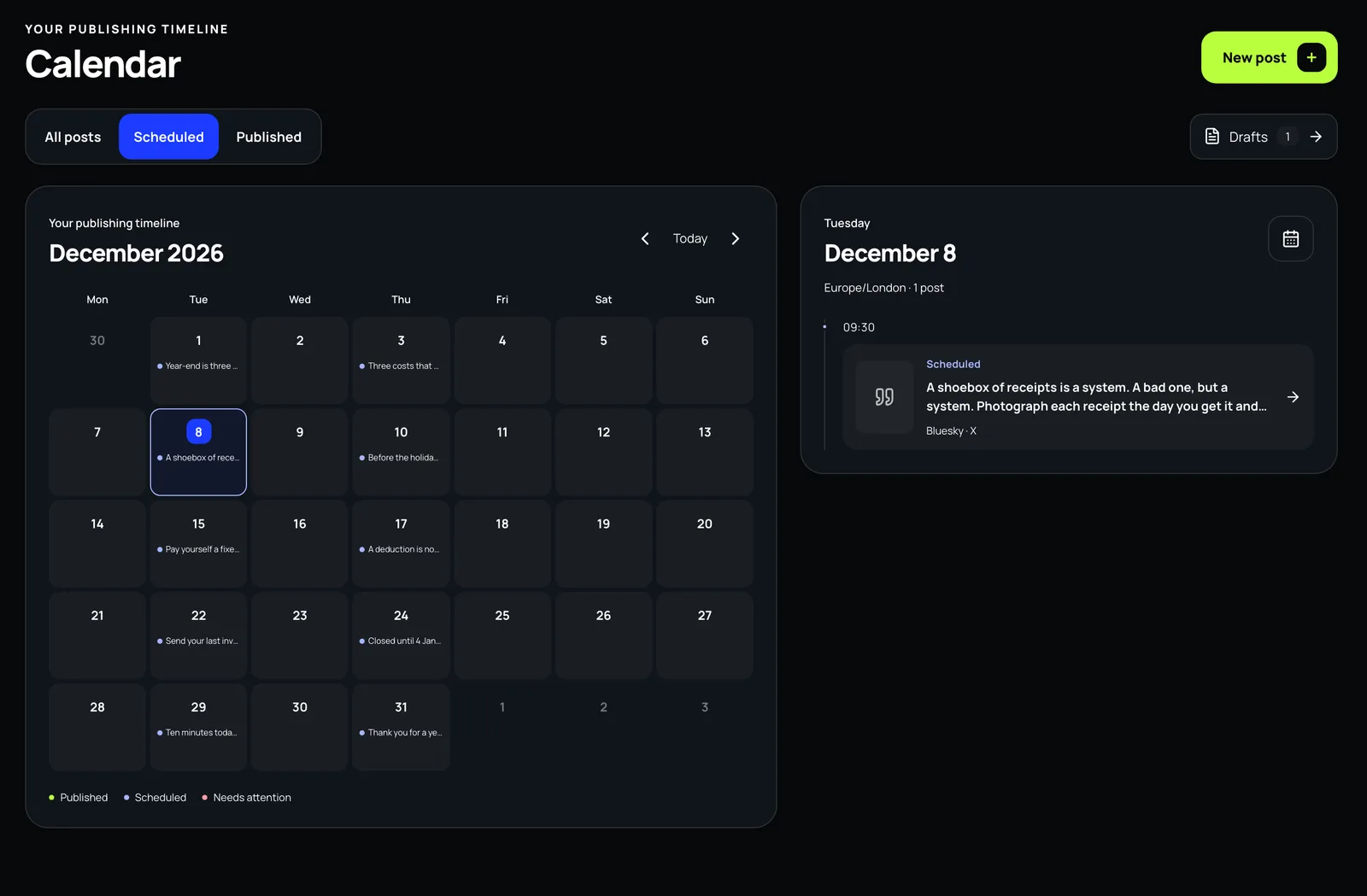
- After I approve: Claude only prepares. Each post waits in Posts until you approve it, signed in; a connection cannot approve its own post, and a scheduled post you approved cannot be moved by it.
- Right away: Claude publishes on its own, to the accounts you ticked, up to the ceiling, until the expiry you chose (1 to 365 days, or none). Hub’s consent screen starts on this mode, so change it if you want to see each post first.
- The journal: every action is in the Activity log with its outcome, and Revoke takes effect on the connection’s next request. Posts it had already scheduled stay scheduled until you cancel them.
What it does not do
- It does not read a file. There is no CSV or spreadsheet import in Hub; you paste the plan, and Claude makes one post per row.
- It has no batch call. Hub’s API takes one post at a time, so a month is a post per call. That is why the daily ceiling and the idempotency key matter.
- Pictures and videos need an address. A post’s picture or video is a public https address the network can fetch (
register_mediachecks it). A list of captions is the easy case. - It does not guarantee every network takes every post. A network can refuse one, and the post says why (what happens then).
- It does not choose your times or promise reach. It schedules what you wrote, when you wrote it.
What has gone out: on 25 October 2026, one customer’s Claude made 49 LinkedIn posts in one sitting, due on 19 different days from 1 November to 20 December, 1 to 3 on a day. On 24 November 2026, 46 had been published on their days, 3 were still scheduled and 0 had failed. The account belongs to a customer and is not named.
Connect Claude to your accounts
AI connections are part of every Mellow Hub plan, with the composer, the Calendar and publishing to 10 networks. New accounts start with a 7-day trial. The server address Claude asks for is https://www.mellow.world/mcp.
Questions
How do I bulk schedule social media posts?
With a tool that takes a file, or with an assistant that makes the posts one by one. Buffer, ContentStudio and HubSpot take a CSV: Buffer up to 10 posts a channel at a time on its Free tier and 100 on paid plans, ContentStudio up to 500, HubSpot up to 300 a file (all read 24 November 2026). Mellow Hub has no CSV upload and no bulk button: you give Claude the list, it checks every post and schedules each one through Hub within the channels, the daily ceiling and the expiry you set.
Can I upload a CSV to schedule posts?
In some tools, yes: 24 November 2026, Buffer’s, ContentStudio’s and HubSpot’s help pages each describe a CSV upload. Meta’s page on creating and managing posts in Meta Business Suite describes one post at a time and mentions no CSV step. Mellow Hub does not take a file. If the list is in a spreadsheet, paste its rows to Claude, which makes one post per row.
How do I schedule a month of social media posts with Claude?
Add Mellow Hub to Claude as a custom connector, approve the access on Hub’s screen, then paste your plan: a date, the networks and the caption for each post. Claude checks every row with validate_post, then makes each post with create_post and a time. A post counts against the daily ceiling on the UTC day it goes out, not the day it is made, so a month of two posts a day fits a limit of two. The table and the prompt above are ready to copy.
How do I bulk schedule LinkedIn posts?
Through Hub, give Claude the dates and the captions and the LinkedIn channel: LinkedIn takes up to 3,000 characters and publishes nothing without a caption. In production on 25 October 2026, one customer’s assistant made 49 LinkedIn posts in one sitting, due on 19 different days; 46 were published on 24 November 2026 and 3 were still scheduled. If you have a finished spreadsheet, a CSV tool may be quicker: check the tool’s page for which networks it takes.
Can I bulk schedule Instagram posts?
Every Instagram post needs a picture or a video, so a list of captions alone is not enough. Buffer’s page says an Instagram post in its CSV needs an image URL, and that a video, reel or carousel is made in its composer. In Hub, each post’s picture or video is a public https address that the network can fetch: Claude can check it with register_media before the post is made. Have the files hosted first, and put each address in the table.
What happens if my list is longer than the daily limit?
The post that would be over the limit is refused, with the day named, and nothing is published or counted for it. The ceiling counts the day a post goes out, so a long list spread over many days is fine, and only a day with too many posts is refused. validate_post says so before anything is made. You set the ceiling from 1 to 1,000 posts a day, and you can raise it later in AI connections.
Can the assistant publish a post I did not approve?
Only if you let it. With After I approve, every post Claude makes waits in Posts until you approve it, signed in; no key or app can approve its own post. With Right away it publishes on its own, but only to the accounts you ticked, up to your daily ceiling and until your expiry, and every action is in the Activity log. Revoke takes effect on its next request.
Do I need a paid Claude plan?
Anthropic’s help page says custom connectors work on the Free, Pro, Max, Ultra, Team and Enterprise plans, with Free limited to one custom connector (read 24 November 2026). Publishing through Mellow Hub needs a Hub plan: every plan starts with a 7-day trial that takes a card.
Related
- Post to social media from Claude (every click, on any Claude plan)
- Post to social media from ChatGPT
- The social media MCP server behind it
- Schedule posts through an API (the same job for your own code)
- LinkedIn from Claude or ChatGPT
- An approval workflow for posts an AI prepared
- A social media content calendar
- How do you schedule LinkedIn posts?
- Can an AI agent manage your social media accounts?